• Latest
  • Trending
  • All
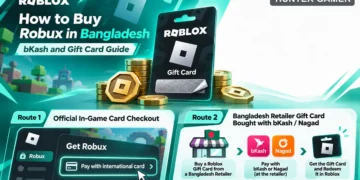
Illustrated two Robux purchase routes: official international-card checkout or retailer gift card bought with bKash or Nagad

How to Buy Robux in Bangladesh: bKash and Gift Card Guide

November 16, 2026
Editorial illustration of a phone framing a miniature football pitch beside a yellow router on a blue surface.

eFootball Mobile Graphics Settings: Fix Stutter in 2026

November 29, 2026
Editorial illustration of a laptop showing a small island landscape beside a packed travel bag and disconnected network cable.

Steam Offline Mode: Prepare Before Losing Internet (2026)

November 29, 2026
Illustration of game installation files being checked for missing components

Steam Verify Game Files: Repair Checklist (2026)

November 29, 2026
Illustration of a phone displaying a miniature football pitch beside a wireless gamepad, with blue connection arcs.

eFootball Mobile Controller Support: Setup Guide (2026)

November 29, 2026
Stylized illustration of game blocks moving between two storage drives on a navy platform.

How to Move Steam Games to Another Drive (2026)

November 29, 2026
Illustration of two phones linked by orange sound waves on a tropical squad-game terrain model.

Free Fire Mic Not Working? Voice Chat Checklist (2026)

November 29, 2026
Symbolic illustration of an Android phone reviewing optional PUBG Mobile resource downloads

PUBG Mobile Storage: Remove Unused Resources (2026)

November 29, 2026
Illustration of gameplay frames looping beside a monitor, with one frame saved to a video tile.

OBS Replay Buffer Guide: Save Gaming Clips in 2026

November 29, 2026
Symbolic comparison of different local and cloud save copies on two computers

Steam Cloud Conflict: Which Save Should You Keep? (2026)

November 29, 2026
Symbolic control layout receiving a share code that repositions its buttons

Free Fire HUD Share Code: Import and Setup Guide (2026)

November 29, 2026
Illustration of a tilted phone above training targets with an amber rotation arrow.

PUBG Mobile Gyroscope Not Working? 2026 Checklist

November 29, 2026
A curved gaming monitor showing a colorful game scene with a glowing timeline bar below it, one segment highlighted in gold.

Steam Game Recording Guide 2026: Save and Export Clips

November 17, 2026
  • About Hunter Gamer
  • Advertising & Sponsorship Opportunities
  • Contact Us for Gaming News & Support
Sunday, November 29, 2026
  • Login
Hunter Gamer
  • Shop
  • Home
  • Mobile Games
    • PUBG
  • PC Games
  • News
  • Insights
  • Streamers
    • Australia
    • Bangladesh
    • Canada
    • Hong Kong
    • India
    • Indonesia
    • Malaysia
    • Moroccan
    • Nepal
    • Singapore
    • Spain
    • Taiwan
    • Thailand
    • Türkiye
    • United Kingdom
    • United States
    • Vietnam
  • Online Games
    • Dex Ball

No products in the cart.

No Result
View All Result
Hunter Gamer
  • Shop
  • Home
  • Mobile Games
    • PUBG
  • PC Games
  • News
  • Insights
  • Streamers
    • Australia
    • Bangladesh
    • Canada
    • Hong Kong
    • India
    • Indonesia
    • Malaysia
    • Moroccan
    • Nepal
    • Singapore
    • Spain
    • Taiwan
    • Thailand
    • Türkiye
    • United Kingdom
    • United States
    • Vietnam
  • Online Games
    • Dex Ball
No Result
View All Result
Hunter Gamer
No Result
View All Result

How to Buy Robux in Bangladesh: bKash and Gift Card Guide

November 16, 2026
in Mobile Games
Reading Time: 6 mins read
0 0
Home Mobile Games
48
VIEWS
Share on FacebookShare on Twitter

If you want to know how to buy Robux in Bangladesh, there are two legitimate routes: buy through Roblox with an international card, or purchase a digital gift card from a Bangladesh store and redeem the code yourself. The second route lets you pay through local services such as bKash, Nagad, or Rocket. Check the product, currency, and final price before sending money.

What is Robux used for?

Roblox is an online game platform and game creation system developed by Roblox Corporation. It is free to play, but in-game purchases use Robux. According to Wikipedia’s overview of Roblox, players buy Robux with real money and use it for avatar items and access to games that require payment.

That distinction matters when shopping: Robux is the virtual currency, while a Roblox gift card is a way to add account credit or Robux through redemption. Read what a store is actually selling instead of choosing only by the product image.

The two buying routes from Bangladesh

Buy directly from Roblox with an international card

Open the official Robux purchase page and sign in to your own account. Use the international-card route if it works for your payment setup. Review the available options and checkout total before confirming. Official prices are displayed dynamically, so use the amount shown in your checkout rather than an old screenshot or an unofficial price list.

Buy a digital gift card using local payments

If you prefer local payment methods, a Bangladesh digital-goods store can sell you a Roblox gift card code. You pay the store, receive the code, and redeem it on Roblox. This is the practical Robux bKash route; it does not mean Roblox itself takes bKash at its official checkout.

For example, GamerShopBD’s Roblox gift card listings advertise digital codes and show bKash, Nagad, and Rocket payment options. The store claims “instant 24/7 delivery.” Treat that as the retailer’s claim, not a delivery guarantee from Hunter Gamer. This listing is evidence of a local buying option, not an endorsement.

How to buy and redeem a gift card

  1. Choose the product carefully. Decide whether you want a listed Robux denomination or a currency-value gift card. Check the full description, including its regional restrictions.
  2. Confirm compatibility before paying. Match the card’s region and currency to your account. If the listing is unclear, ask the seller to explain it before you place the order.
  3. Check the final taka total. Read the checkout amount and delivery terms. Do not assume a price from a search result still applies.
  4. Pay through the store’s checkout. Select bKash, Nagad, or Rocket if offered. Keep your payment confirmation and order details so you can identify the purchase if there is a problem.
  5. Receive your digital code. You should be buying a code you can redeem yourself. A gift card purchase should not require giving the seller your Roblox password.
  6. Open the official redemption page. Visit Roblox’s gift card redemption page and sign in. Check that you are using the account you want to receive the credit or Robux.
  7. Enter the PIN and follow the prompts. Review the redemption result on Roblox. Keep the code private rather than posting it in a public support comment or screenshot.

Hunter Gamer does not sell Robux. This guide explains the buying routes and checks to make; purchases and code delivery happen through the provider you choose.
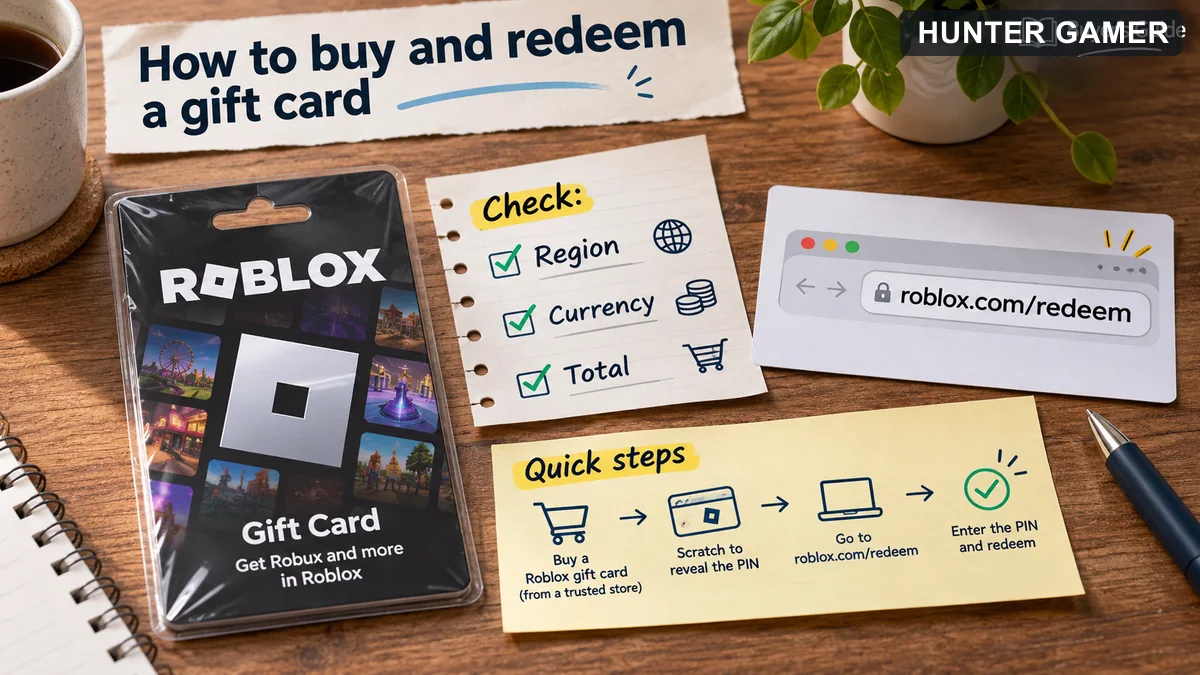
Roblox gift card buyer checklist for region, currency and final total, with official roblox.com/redeem address

Robux prices in Bangladesh: comparison examples

The figures below were listed around these amounts, as of September 2026. They are one BD retailer’s listed prices for comparison, taken from GamerShopBD’s category and product listings. They are not official Roblox prices, fixed market rates, or recommendations. Prices change with the taka rate, so check the current checkout total.

Listed gift-card denominationSample BD price, as of September 2026
200 RobuxListed around ৳890
400 RobuxListed around ৳1,290
1500 RobuxListed around ৳3,490
$10 gift cardListed around ৳1,680
$20 gift cardListed around ৳3,280
$50 gift cardListed around ৳7,800

A dollar-value gift card is not a verified Robux quantity. The dollar amounts above describe gift card denominations, not official USD prices for buying Robux. Compare like-for-like products and do not assume every card gives the same kind of balance.

Check region and currency before buying

Roblox gift cards are region-locked by currency, so choose a card matching your account region. Bangladesh reseller listings include cards labelled GLOBAL alongside country-specific currency cards. A mismatched card may not redeem.

Illustrative matched US-dollar card and US account versus mismatched Euro card and US account; ask seller before paying

Do not treat “available in Bangladesh” as proof that a card suits your account. Read the exact region label and ask about compatibility if needed. If redemption fails, check the code entry and product region first. Contact the seller about the purchased code, and use Roblox support only through roblox.com for account-related help.

Avoid free Robux sites and password requests

Roblox scams often use messages about websites or games that supposedly give out free Robux. Phishing sites can steal accounts and items. Never enter your Roblox password on a third-party free Robux site, even if its page looks familiar.

  • Avoid “cheap Robux” offers from random Facebook pages or Discord DMs.
  • Do not pay for a vague promise with no redeemable code. No code to redeem means no protection through the gift-card flow described here.
  • Never share your account password with a seller or someone claiming to provide support.
  • Open the official Roblox pages yourself instead of trusting a redemption link sent by a stranger.

Other top-ups you can pay for the same way

If you also use local payments for other games, read our guides to Free Fire diamond top-ups with bKash, PUBG UC top-ups with bKash in Bangladesh, and buying Steam Wallet credit with bKash. Keep the same habit across purchases: check the product, payment total, and account compatibility before paying.

Frequently asked questions

Can I buy Robux with bKash in Bangladesh?

Yes, you can use bKash to buy a digital Roblox gift card from a Bangladesh store that offers it, then redeem the code on roblox.com/redeem. Some stores also list Nagad and Rocket. This is a retailer payment route, not a claim that Roblox’s official checkout accepts bKash.

Is a Roblox gift card bought in Bangladesh safe to redeem?

A legitimate digital gift card is redeemed on the official Roblox site. Buying from a BD store alone does not guarantee that a code is genuine or compatible, so check the seller, product description, and region before paying. Redeem it yourself and never give the seller your Roblox password.

Why won’t my Roblox gift card redeem?

A region or currency mismatch may prevent redemption. Check the PIN entry and compare the card’s regional label with your account region. Contact the seller about the code, and seek Roblox account support only through roblox.com.

Are free Robux generators real?

Do not treat free Robux generators as a legitimate buying route. Free Robux messages and websites are a known scam pattern, and phishing pages can steal accounts and items. Never enter your Roblox password on these sites.
Published by

Hunter Gamer

Hunter Gamer has covered games, esports, and streamers for readers in Bangladesh and beyond since 2019. The site publishes gaming news and explainers, practical settings and troubleshooting guides for mobile and PC players, Bangladesh buying information for gaming hardware and digital products, and profiles of creators alongside their official channels.

Articles are built on official game, platform, and product information where it is available, and sources are linked when a claim needs attribution. Because prices, release dates, and game settings change, each article carries a review date and readers are asked to check the linked source before buying anything or changing an account setting. Where something cannot be verified, the article says so rather than guessing. Articles are revised when an error is found or when a change makes an older guide misleading — corrections and news tips are welcome through the contact page.

About Hunter GamerSpotted an error? Tell us

Previous Post

Steam Wallet with bKash in Bangladesh: Safe Buying Guide

Next Post

BGMI Sensitivity Code Latest: 2026 Gyro and Non-Gyro Guide

Related Posts

Editorial illustration of a phone framing a miniature football pitch beside a yellow router on a blue surface.
Mobile Games

eFootball Mobile Graphics Settings: Fix Stutter in 2026

November 29, 2026
Illustration of a phone displaying a miniature football pitch beside a wireless gamepad, with blue connection arcs.
Mobile Games

eFootball Mobile Controller Support: Setup Guide (2026)

November 29, 2026
Illustration of two phones linked by orange sound waves on a tropical squad-game terrain model.
Mobile Games

Free Fire Mic Not Working? Voice Chat Checklist (2026)

November 29, 2026
Next Post
Two mobile game practice setups comparing phone tilt with thumb swipe aiming

BGMI Sensitivity Code Latest: 2026 Gyro and Non-Gyro Guide

PUBG Mobile four finger claw grip showing thumbs for movement and camera and index fingers for fire and ADS

PUBG Mobile 4 Finger Claw Controls Code: 2026 HUD Guide

Illustrated physical gaming mouse travel between two tactical games for cross-game sensitivity matching

Valorant Sensitivity Converter: Match Your Aim Across Games

Comments 3

  1. Pingback: How to Get Free Robux in 2026: Legit Ways Without Scams
  2. Pingback: Free Robux Codes: The Honest Truth for Bangladesh Players
  3. Pingback: Discord Nitro Price in Bangladesh: 2026 Cost & bKash Guide

Leave a Reply Cancel reply

Your email address will not be published. Required fields are marked *

Categories

  • Mobile Games
  • News
  • PC Games
  • PUBG
  • Reviews

Topics

2024 PUBG tricks Best Fortnite Xp Maps Best Games Fortnite Fortnite Xp Maps Gamer Lag fix PMPL 2023 South Asia PUBG PUBG game performance PUBG mobile lag fix Xp Maps
  • Top-Up Shop
  • About Us
  • Contact
  • Privacy Policy and Data Protection
  • Terms and Conditions of Website Use
  • Refund and Returns Policy for Digital Products
Call us: +880 1711 189127

Copyright © 2020 - 2026 Hunter Gamer · All Rights Reserved.

Welcome Back!

Login to your account below

Forgotten Password?

Retrieve your password

Please enter your username or email address to reset your password.

Log In
No Result
View All Result
  • Shop
  • Home
  • Mobile Games
    • PUBG
  • PC Games
  • News
  • Insights
  • Streamers
    • Australia
    • Bangladesh
    • Canada
    • Hong Kong
    • India
    • Indonesia
    • Malaysia
    • Moroccan
    • Nepal
    • Singapore
    • Spain
    • Taiwan
    • Thailand
    • Türkiye
    • United Kingdom
    • United States
    • Vietnam
  • Online Games
    • Dex Ball

Copyright © 2020 - 2026 Hunter Gamer · All Rights Reserved.