• Latest
  • Trending
  • All
Mobile Legends diamond pack and bKash reseller checkout illustration over a fantasy MOBA battlefield

Mobile Legends Diamond Top Up Bangladesh: Safe Buy Guide

November 16, 2026
Editorial illustration of a phone framing a miniature football pitch beside a yellow router on a blue surface.

eFootball Mobile Graphics Settings: Fix Stutter in 2026

November 29, 2026
Editorial illustration of a laptop showing a small island landscape beside a packed travel bag and disconnected network cable.

Steam Offline Mode: Prepare Before Losing Internet (2026)

November 29, 2026
Illustration of game installation files being checked for missing components

Steam Verify Game Files: Repair Checklist (2026)

November 29, 2026
Illustration of a phone displaying a miniature football pitch beside a wireless gamepad, with blue connection arcs.

eFootball Mobile Controller Support: Setup Guide (2026)

November 29, 2026
Stylized illustration of game blocks moving between two storage drives on a navy platform.

How to Move Steam Games to Another Drive (2026)

November 29, 2026
Illustration of two phones linked by orange sound waves on a tropical squad-game terrain model.

Free Fire Mic Not Working? Voice Chat Checklist (2026)

November 29, 2026
Symbolic illustration of an Android phone reviewing optional PUBG Mobile resource downloads

PUBG Mobile Storage: Remove Unused Resources (2026)

November 29, 2026
Illustration of gameplay frames looping beside a monitor, with one frame saved to a video tile.

OBS Replay Buffer Guide: Save Gaming Clips in 2026

November 29, 2026
Symbolic comparison of different local and cloud save copies on two computers

Steam Cloud Conflict: Which Save Should You Keep? (2026)

November 29, 2026
Symbolic control layout receiving a share code that repositions its buttons

Free Fire HUD Share Code: Import and Setup Guide (2026)

November 29, 2026
Illustration of a tilted phone above training targets with an amber rotation arrow.

PUBG Mobile Gyroscope Not Working? 2026 Checklist

November 29, 2026
A curved gaming monitor showing a colorful game scene with a glowing timeline bar below it, one segment highlighted in gold.

Steam Game Recording Guide 2026: Save and Export Clips

November 17, 2026
  • About Hunter Gamer
  • Advertising & Sponsorship Opportunities
  • Contact Us for Gaming News & Support
Sunday, November 29, 2026
  • Login
Hunter Gamer
  • Shop
  • Home
  • Mobile Games
    • PUBG
  • PC Games
  • News
  • Insights
  • Streamers
    • Australia
    • Bangladesh
    • Canada
    • Hong Kong
    • India
    • Indonesia
    • Malaysia
    • Moroccan
    • Nepal
    • Singapore
    • Spain
    • Taiwan
    • Thailand
    • Türkiye
    • United Kingdom
    • United States
    • Vietnam
  • Online Games
    • Dex Ball

No products in the cart.

No Result
View All Result
Hunter Gamer
  • Shop
  • Home
  • Mobile Games
    • PUBG
  • PC Games
  • News
  • Insights
  • Streamers
    • Australia
    • Bangladesh
    • Canada
    • Hong Kong
    • India
    • Indonesia
    • Malaysia
    • Moroccan
    • Nepal
    • Singapore
    • Spain
    • Taiwan
    • Thailand
    • Türkiye
    • United Kingdom
    • United States
    • Vietnam
  • Online Games
    • Dex Ball
No Result
View All Result
Hunter Gamer
No Result
View All Result

Mobile Legends Diamond Top Up Bangladesh: Safe Buy Guide

November 16, 2026
in Mobile Games
Reading Time: 6 mins read
0 0
Home Mobile Games
54
VIEWS
Share on FacebookShare on Twitter

MLBB is huge in Bangladesh, and a new skin can make your diamond balance feel very small. If you are searching for mobile legends diamond top up Bangladesh options, start with the pack, payment route and final Tk total—not just a cheap offer. Diamonds can get you Starlight Member & Twilight Pass rewards, unlock champions and buy champion skins.

Moonton’s free-to-play MOBA has crossed a billion downloads worldwide, according to the Mobile Legends: Bang Bang overview. For a familiar face from the game’s creator scene, check our Jess No Limit — famous Mobile Legends streamer profile. Here, the focus is getting diamonds without handing over your account.

Find your MLBB User ID and Zone ID

Get your account details ready before opening a top-up page. Delivery needs your User ID and Zone ID from your in-game profile. Your nickname is not a substitute for those details.
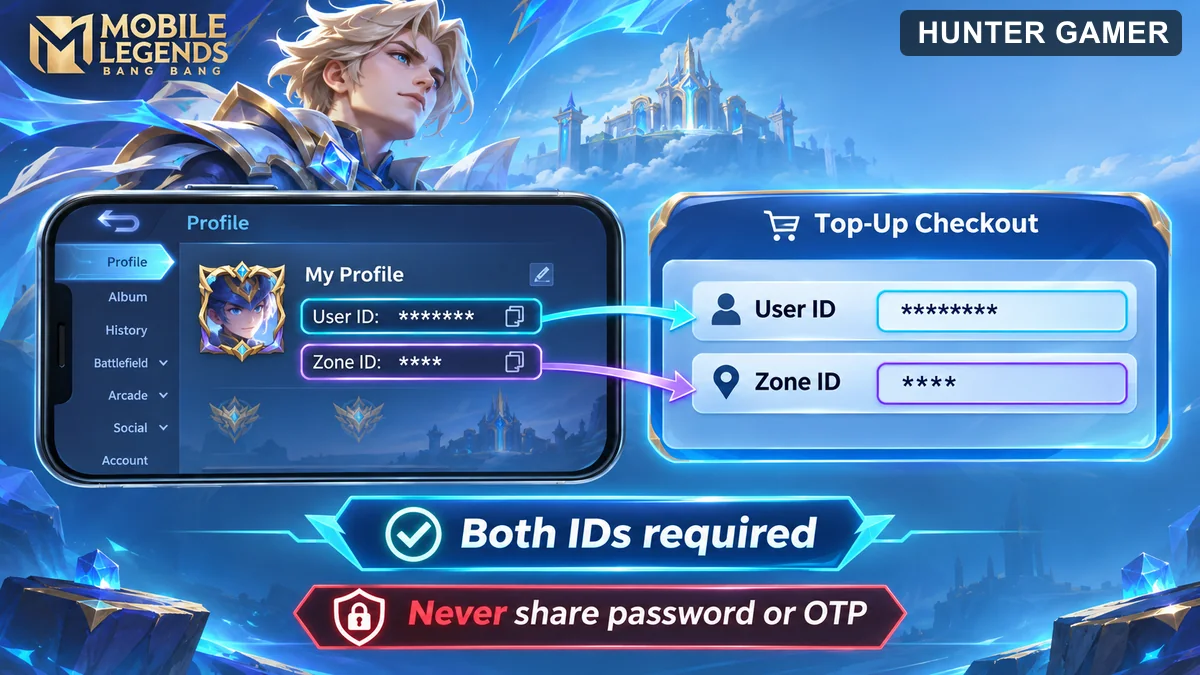
Illustrative Mobile Legends profile showing both masked User ID and Zone ID needed in top-up checkout
  1. Open Mobile Legends and go to your in-game profile.
  2. Find the User ID and Zone ID shown with your account information.
  3. Copy or carefully note both values.
  4. Compare them with the checkout fields before paying.

A top-up seller does not need your MLBB password, a login or an OTP to deliver diamonds. If the seller asks for any of those, stop there, bhai.

Route 1: Authorized reseller with bKash

For mobile legends top up bkash searches, Codashop Bangladesh is the authorized reseller route covered here. Its Bangladesh Mobile Legends top-up page lists diamond packs, Robi/Cirkle and bKash payment options, and immediate delivery after payment. It also says no registration or login is required.

bKash is a Bangladesh mobile financial service operating under Bangladesh Bank’s authority. Pay from your own bKash account, and keep account security separate from the game details you give the reseller.

How to buy through Codashop BD

  1. Pick the diamond pack you want and check its bonus diamonds.
  2. Enter your MLBB User ID and Zone ID in the matching fields.
  3. Choose Robi/Cirkle or bKash from the payment options. For a bKash purchase, select bKash.
  4. Check the final Tk amount, then complete payment from your own bKash account through the payment flow.
  5. Return to MLBB and check your balance. Codashop says the diamonds are added immediately.

That delivery wording is the reseller’s stated service, not a timing result from our own purchase test. Check the payment status before starting another transaction if your balance has not updated.

Listed MLBB diamond prices in Bangladesh

These packs were listed at Codashop BD at the time of writing, discounts and prices can change:

  • 33 diamonds: 30 plus 3 bonus, from Tk 50.
  • 66 diamonds: 60 plus 6 bonus, from Tk 100.
  • 131 diamonds: 119 plus 12 bonus, from Tk 200.
  • 325 diamonds: 295 plus 30 bonus, from Tk 500.

Use these as reference tiers when comparing an ml diamond top up bd offer. The checkout total matters more than an old screenshot or a seller’s headline price.

Route 2: Buy through the in-game store

You can also buy diamonds through MLBB’s in-game store, with billing handled through Google Play or the App Store. Available payment methods depend on your store account and region. Do not assume a method shown by an external reseller will also appear in your app-store checkout.

Open the diamond purchase area in the game, choose your pack and review the platform’s payment screen. Compare the displayed total with your budget before confirming. This guide does not claim that bKash works through Google Play or the App Store.

Route 3: Local top-up shops and support

Local top-up shops are another route to consider, but evaluate the seller rather than trusting a low-price post. Ask for the exact pack, included bonus diamonds and final Tk total before paying. Look for a clear support channel you can use if the order needs checking.
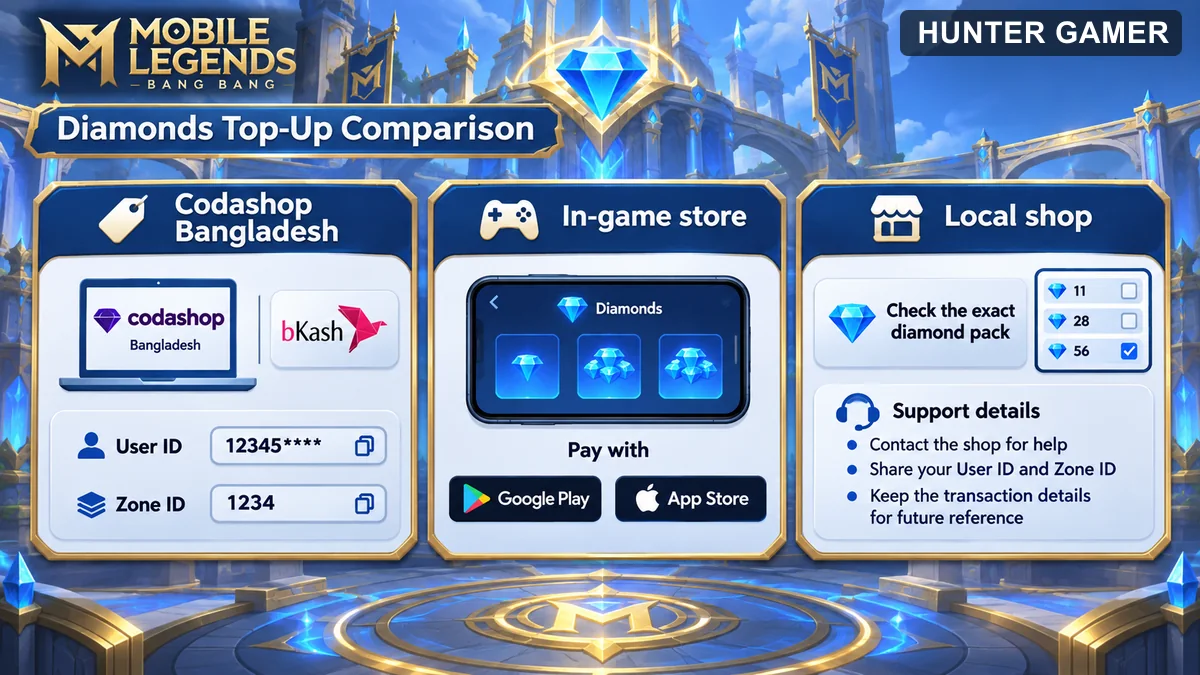
Comparison of Codashop Bangladesh with bKash, in-game app-store billing and local shop diamond pack checks

Marketplace-style services with accessible support matter because you need somewhere to raise a payment or delivery question. Support alone is not proof that every offer is safe. Keep your order details and avoid any seller who wants access to your game account.

For other games, the Hunter Gamer top-up marketplace for Free Fire diamonds & PUBG UC is relevant; it is not presented here as an MLBB diamond seller. PUBG players can also read our PUBG UC top-up via bKash guide.

Compare the top-up routes

RouteHow you payWhat you enterDelivery speed
Codashop BangladeshbKash or Robi/Cirkle, subject to availabilityUser ID and Zone IDImmediate, according to Codashop
In-game storeGoogle Play or App Store billing; methods depend on account and regionStore payment confirmation within the game purchase flowCheck the purchase status; no timing promise here
Local top-up shopConfirm the seller’s available payment routeUser ID and Zone ID only for deliveryAsk the seller before paying

Safety checks before you pay

  • Protect your login: diamond delivery only needs your User ID and Zone ID. Seller requests for passwords or OTPs are a scam signal. Never send those codes in chat.
  • Question unusually cheap diamonds: prices far below known tiers can signal stolen-payment or account-ban risk.
  • Check the whole offer: prefer pages showing the exact pack, bonus and final Tk total before payment.
  • Watch for maintenance: a Codashop payment rail showed a Maintenance tag when checked. If a rail is unavailable, retry later or choose another available rail.

Keep your diamond spending under control

Bonus-diamond tiers give extra dias, and the per-diamond rate can improve on bigger packs. Still, compare the final total against all diamonds included rather than assuming every larger pack is a better deal.

If you want to buy MLBB diamonds Bangladesh players can pay for comfortably, start with what you actually need. A bigger pack is not a saving if it pushes you past your budget. Pick the reward, check the pack and keep your login private.

Frequently asked questions

How do I buy Mobile Legends diamonds with bKash in Bangladesh?

Open Codashop Bangladesh’s Mobile Legends page, pick a pack and enter your User ID plus Zone ID. Select bKash, check the final Tk total and pay from your own bKash account. Codashop says diamonds are added immediately after payment; if the payment rail is under maintenance, retry later or choose another available option.

How much do MLBB diamonds cost in Bangladesh?

Codashop BD listed 33 diamonds from Tk 50, 66 from Tk 100, 131 from Tk 200 and 325 from Tk 500 at the time of writing. These totals include the listed bonus diamonds. Discounts and prices can change, so check the final checkout amount before paying.

Why does the seller need my User ID and Zone ID?

Your User ID and Zone ID identify the MLBB account that should receive the diamonds. Find both in your in-game profile and check them carefully before payment. Delivery does not require your password, an OTP or account login access.

Is buying MLBB diamonds from third-party sites safe?

It depends on the seller; do not treat every third-party offer as safe. Prefer an authorized reseller with clear pack details, a final Tk total and accessible support. Requests for passwords or OTPs are scam signals, while prices far below known tiers can carry stolen-payment or account-ban risk.
Related Hunter Gamer Guides

More safe top-up guides: PUBG UC bKash Guide · Free Diamonds Legit Ways · All Top Up Guides for Bangladesh

Published by

Hunter Gamer

Hunter Gamer has covered games, esports, and streamers for readers in Bangladesh and beyond since 2019. The site publishes gaming news and explainers, practical settings and troubleshooting guides for mobile and PC players, Bangladesh buying information for gaming hardware and digital products, and profiles of creators alongside their official channels.

Articles are built on official game, platform, and product information where it is available, and sources are linked when a claim needs attribution. Because prices, release dates, and game settings change, each article carries a review date and readers are asked to check the linked source before buying anything or changing an account setting. Where something cannot be verified, the article says so rather than guessing. Articles are revised when an error is found or when a change makes an older guide misleading — corrections and news tips are welcome through the contact page.

About Hunter GamerSpotted an error? Tell us

Previous Post

PUBG UC Top Up Bangladesh: How to Buy UC Safely via bKash

Next Post

Steam Wallet with bKash in Bangladesh: Safe Buying Guide

Related Posts

Editorial illustration of a phone framing a miniature football pitch beside a yellow router on a blue surface.
Mobile Games

eFootball Mobile Graphics Settings: Fix Stutter in 2026

November 29, 2026
Illustration of a phone displaying a miniature football pitch beside a wireless gamepad, with blue connection arcs.
Mobile Games

eFootball Mobile Controller Support: Setup Guide (2026)

November 29, 2026
Illustration of two phones linked by orange sound waves on a tropical squad-game terrain model.
Mobile Games

Free Fire Mic Not Working? Voice Chat Checklist (2026)

November 29, 2026
Next Post
Illustrative Steam Wallet code card with bKash payment through a local retailer

Steam Wallet with bKash in Bangladesh: Safe Buying Guide

Illustrated two Robux purchase routes: official international-card checkout or retailer gift card bought with bKash or Nagad

How to Buy Robux in Bangladesh: bKash and Gift Card Guide

Two mobile game practice setups comparing phone tilt with thumb swipe aiming

BGMI Sensitivity Code Latest: 2026 Gyro and Non-Gyro Guide

Comments 3

  1. Pingback: Mobile Legends Weekly Diamond Pass Cost Bangladesh 2026
  2. Pingback: Google Play Gift Card Bangladesh 2026: Prices & bKash Guide
  3. Pingback: Genshin Impact Top Up Bangladesh: 2026 Safe Price Guide

Leave a Reply Cancel reply

Your email address will not be published. Required fields are marked *

Categories

  • Mobile Games
  • News
  • PC Games
  • PUBG
  • Reviews

Topics

2024 PUBG tricks Best Fortnite Xp Maps Best Games Fortnite Fortnite Xp Maps Gamer Lag fix PMPL 2023 South Asia PUBG PUBG game performance PUBG mobile lag fix Xp Maps
  • Top-Up Shop
  • About Us
  • Contact
  • Privacy Policy and Data Protection
  • Terms and Conditions of Website Use
  • Refund and Returns Policy for Digital Products
Call us: +880 1711 189127

Copyright © 2020 - 2026 Hunter Gamer · All Rights Reserved.

Welcome Back!

Login to your account below

Forgotten Password?

Retrieve your password

Please enter your username or email address to reset your password.

Log In
No Result
View All Result
  • Shop
  • Home
  • Mobile Games
    • PUBG
  • PC Games
  • News
  • Insights
  • Streamers
    • Australia
    • Bangladesh
    • Canada
    • Hong Kong
    • India
    • Indonesia
    • Malaysia
    • Moroccan
    • Nepal
    • Singapore
    • Spain
    • Taiwan
    • Thailand
    • Türkiye
    • United Kingdom
    • United States
    • Vietnam
  • Online Games
    • Dex Ball

Copyright © 2020 - 2026 Hunter Gamer · All Rights Reserved.