• Latest
  • Trending
  • All
Editorial laptop hardware checklist for CPU, RAM, graphics and storage before installing PUBG Mobile emulator

PUBG Mobile PC Requirements: Check Your Laptop Can Run It

November 16, 2026
Illustration of a phone displaying a miniature football pitch beside a wireless gamepad, with blue connection arcs.

eFootball Mobile Controller Support: Setup Guide (2026)

November 24, 2026
Stylized illustration of game blocks moving between two storage drives on a navy platform.

How to Move Steam Games to Another Drive (2026)

November 23, 2026
Illustration of two phones linked by orange sound waves on a tropical squad-game terrain model.

Free Fire Mic Not Working? Voice Chat Checklist (2026)

November 22, 2026
Symbolic illustration of an Android phone reviewing optional PUBG Mobile resource downloads

PUBG Mobile Storage: Remove Unused Resources (2026)

November 21, 2026
Illustration of gameplay frames looping beside a monitor, with one frame saved to a video tile.

OBS Replay Buffer Guide: Save Gaming Clips in 2026

November 21, 2026
Symbolic comparison of different local and cloud save copies on two computers

Steam Cloud Conflict: Which Save Should You Keep? (2026)

November 21, 2026
Symbolic control layout receiving a share code that repositions its buttons

Free Fire HUD Share Code: Import and Setup Guide (2026)

November 21, 2026
Illustration of a tilted phone above training targets with an amber rotation arrow.

PUBG Mobile Gyroscope Not Working? 2026 Checklist

November 17, 2026
A curved gaming monitor showing a colorful game scene with a glowing timeline bar below it, one segment highlighted in gold.

Steam Game Recording Guide 2026: Save and Export Clips

November 17, 2026
Two smartphones moving a glowing stream with a soccer ball from the old phone to the new phone under stadium lights.

eFootball Mobile Data Transfer: New Phone Guide (2026)

November 16, 2026
A smartphone wrapped in a glowing orange energy dome with a chain of light linking it to a floating shield emblem.

How to Bind a Free Fire Guest Account Safely in 2026

November 16, 2026
valorant settings guide hero

VALORANT Settings Guide: Seven Options Worth Checking

November 16, 2026
  • About Hunter Gamer
  • Advertising & Sponsorship Opportunities
  • Contact Us for Gaming News & Support
Tuesday, November 24, 2026
  • Login
Hunter Gamer
  • Shop
  • Home
  • Mobile Games
    • PUBG
  • PC Games
  • News
  • Insights
  • Streamers
    • Australia
    • Bangladesh
    • Canada
    • Hong Kong
    • India
    • Indonesia
    • Malaysia
    • Moroccan
    • Nepal
    • Singapore
    • Spain
    • Taiwan
    • Thailand
    • Türkiye
    • United Kingdom
    • United States
    • Vietnam
  • Online Games
    • Dex Ball

No products in the cart.

No Result
View All Result
Hunter Gamer
  • Shop
  • Home
  • Mobile Games
    • PUBG
  • PC Games
  • News
  • Insights
  • Streamers
    • Australia
    • Bangladesh
    • Canada
    • Hong Kong
    • India
    • Indonesia
    • Malaysia
    • Moroccan
    • Nepal
    • Singapore
    • Spain
    • Taiwan
    • Thailand
    • Türkiye
    • United Kingdom
    • United States
    • Vietnam
  • Online Games
    • Dex Ball
No Result
View All Result
Hunter Gamer
No Result
View All Result

PUBG Mobile PC Requirements: Check Your Laptop Can Run It

November 16, 2026
in Mobile Games, PUBG
Reading Time: 6 mins read
0 0
Home Mobile Games
36
VIEWS
Share on FacebookShare on Twitter

Can your PC run PUBG Mobile through an emulator?

Before downloading an emulator on your home PC or study laptop, check its processor, memory, graphics and free storage. The useful answer to PUBG Mobile PC requirements is not a single universal specification: GameLoop and BlueStacks publish requirements with different scopes. Meeting a listed minimum is an entry check, not a promise of smooth gameplay.

PUBG Mobile has no native PC version; playing it on a computer means using an Android emulator. It is the free-to-play battle royale co-developed by LightSpeed Studios and PUBG Corporation, adapted from PUBG: Battlegrounds. It launched on Android and iOS on 19 March 2018, as documented on Wikipedia’s PUBG Mobile page. These checks concern that mobile game, not the separate PC game.

Compare each publisher’s own stated minimum

GameLoop, Tencent’s emulator formerly called Tencent Gaming Buddy, lists the following requirements specifically on its PUBG page. BlueStacks lists its general App Player minimum on its PUBG page; running the game adds load on top. These are not comparable benchmarks, and a lower number in one column does not prove that emulator is lighter or faster.
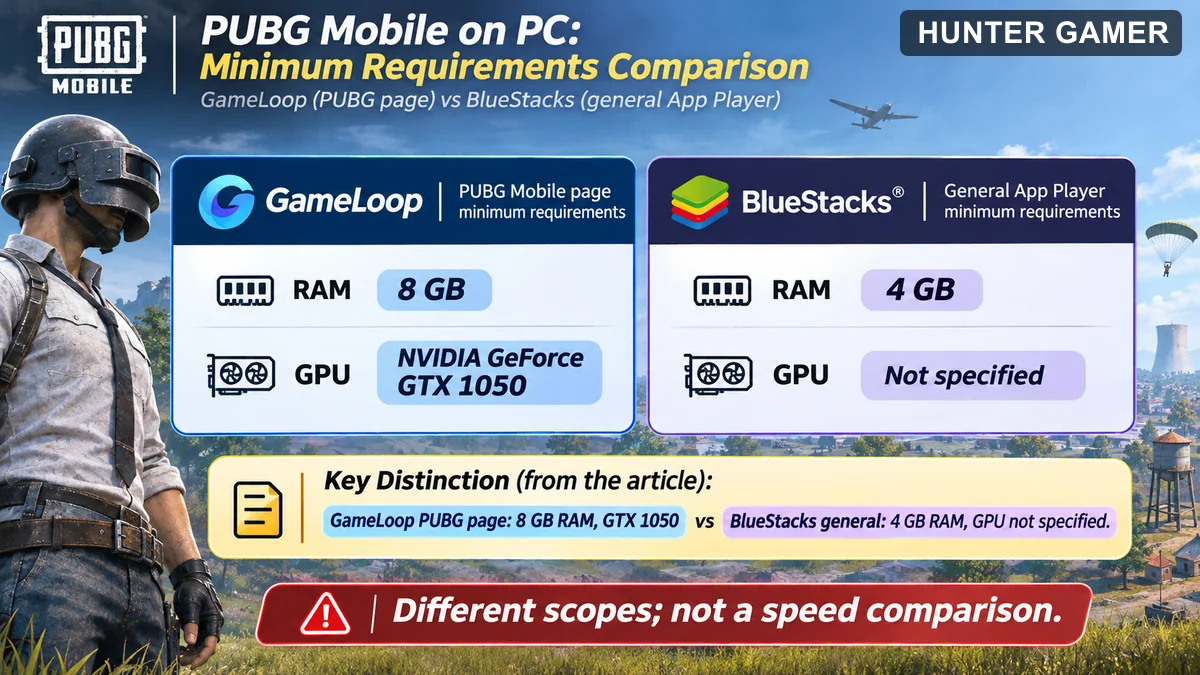
Article-based comparison: GameLoop PUBG-page 8 GB RAM and GTX 1050 versus BlueStacks general 4 GB RAM and unspecified GPU; different scopes
ComponentGameLoop stated (PUBG page)BlueStacks 5 stated (general)
OSWindows 8.1 64-bit or Windows 10 64-bitWindows 7 or above, or macOS 11 Big Sur or above
CPUIntel Core i3-8300Intel, AMD or Apple Silicon processor
GPUGTX 1050No specific GPU named in the stated general minimum; up-to-date graphics drivers required
RAM8GBAt least 4GB
Storage1GB available10GB free disk space
Scope noteDifferently-scoped publisher minimums: GameLoop’s PUBG-page requirements versus BlueStacks’ general App Player requirements. They are not equivalent performance tests.

BlueStacks also requires administrator rights. Confirm that you can install software on the computer, particularly if you share it with family or use a managed study machine. Free disk space cannot replace RAM; BlueStacks explicitly makes that distinction.

What GameLoop recommends above its minimum

GameLoop’s recommended tier lists an Intel Core i3-9320 and 16GB RAM. Its stated OS, GPU and available storage remain the same: Windows 8.1 64-bit or Windows 10 64-bit, GTX 1050 and 1GB. Treat the minimum as the entry bar and the recommended tier as a comfort zone, not a guaranteed gameplay result.

Before committing to a download, check the official GameLoop PUBG requirements and the official BlueStacks PUBG requirements. Vendors revise their requirements, so those pages should be your final reference rather than an old screenshot or a friend’s remembered specs.

Check your laptop before downloading

Write down the actual hardware

Use your computer’s system information and hardware details to record the exact CPU model, installed RAM, graphics hardware and operating system. On a Windows laptop, also confirm whether the operating system is 64-bit when checking GameLoop’s requirements. Compare those details against the table instead of relying on a label such as “gaming laptop” or “Core i3.”

  • CPU: Compare the complete model name with GameLoop’s listed processor. BlueStacks’ broader processor wording is not a promise that every listed processor family delivers the same experience.
  • RAM: Check installed memory, not storage capacity. A laptop with 4GB reaches BlueStacks’ general memory minimum but falls below GameLoop’s stated 8GB minimum.
  • GPU: Find out whether the laptop has a dedicated graphics card or only integrated graphics. Do not assume the processor label tells you which graphics hardware is installed.
  • Storage: Check available space, not the drive’s total capacity, and free the amount stated by the publisher you are considering.

Prepare the machine, not just the download

Update your graphics drivers before evaluating the emulator; BlueStacks explicitly stresses current drivers. Close background apps so they are not adding unnecessary load while you play. For a shared laptop, check what is running before starting rather than assuming all installed memory is available to the game.

Keep the storage figures in context. GameLoop states 1GB available on its PUBG page, while BlueStacks states 10GB free for its general App Player minimum. These differently-scoped numbers are not evidence that one complete setup will use less space. Check the current official information before deciding whether your drive has enough room.

What if your laptop only has integrated graphics?

An integrated-graphics-only laptop falls below GameLoop’s stated PUBG-page minimum, which names a GTX 1050. Be honest about that mismatch: do not treat meeting the CPU and RAM entries as meeting the entire table.
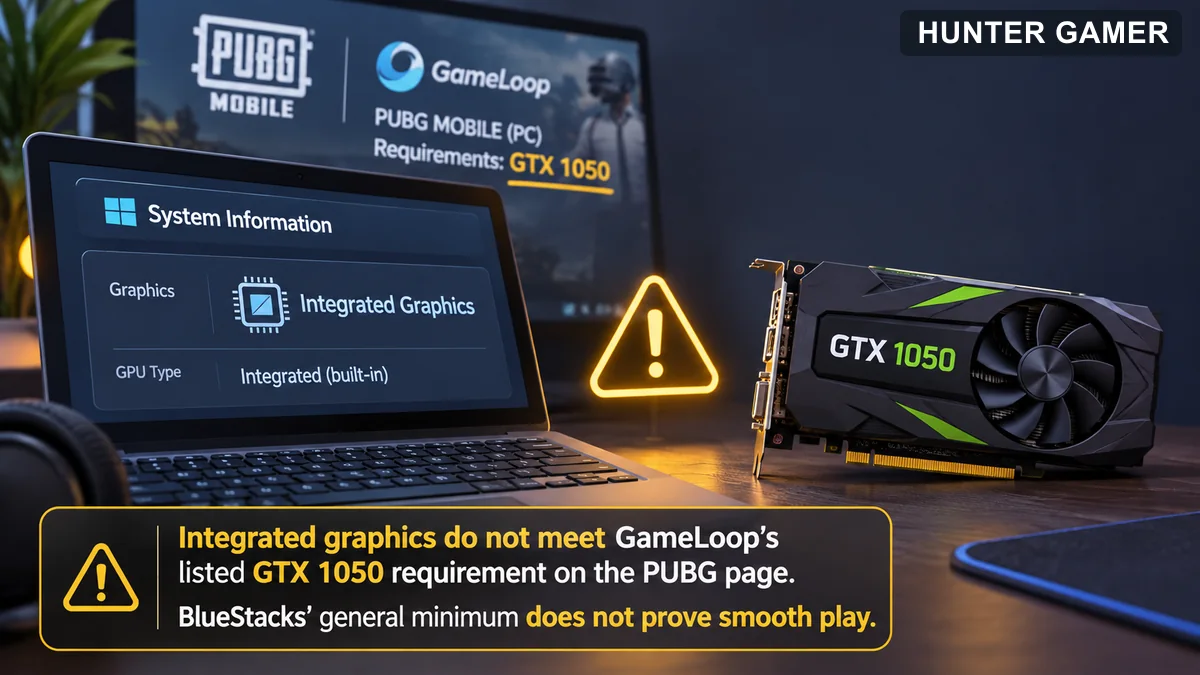
Illustration contrasting laptop integrated graphics with GameLoop's listed GTX 1050 requirement and warning that BlueStacks general minimum does not guarantee smooth play

BlueStacks’ general minimum does not name a specific GPU. That leaves a different stated entry bar, not proof that PUBG Mobile will run smoothly on your integrated graphics. If you want to try it, use the official source and keep expectations cautious. Our guide to comparing GameLoop and BlueStacks for PUBG Mobile can help you consider the options without treating these minimums as a head-to-head performance test.

Requirements for a target frame rate

Neither emulator publisher publishes per-frame-rate hardware tiers. You therefore cannot turn these minimums into a reliable shopping list for a particular frame-rate target. Actual smoothness depends on graphics drivers, laptop thermals, game settings and background load, alongside the hardware.

Use the minimum to screen your machine before downloading, and GameLoop’s recommended tier as the more comfortable reference where applicable. Avoid buying an upgrade solely because someone claims a listed CPU or RAM amount guarantees a particular result. These specifications do not support that promise.

Your download decision

  • Meet GameLoop’s stated bar? Recheck the current publisher page, then follow the full GameLoop download and setup walkthrough.
  • Meet only BlueStacks’ general minimum? Remember that PUBG Mobile adds load beyond the App Player itself. Treat installation as a cautious trial, not confirmation of smooth play.
  • Already installed but struggling? Check drivers, background apps and settings, then use our guide to fixing PUBG lag and tuning performance.

The practical takeaway: match your exact hardware to the correct publisher’s bar, understand its scope, and verify current requirements before downloading.

Frequently asked questions

Can a laptop with 4GB RAM run PUBG Mobile through an emulator?

4GB RAM meets BlueStacks’ general App Player memory minimum, but PUBG Mobile adds load on top. It does not meet GameLoop’s stated PUBG-page minimum of 8GB. Check the other requirements too; meeting the memory minimum alone does not guarantee smooth gameplay.

Can I play PUBG Mobile on a laptop with only integrated graphics?

Integrated graphics fall below GameLoop’s stated PUBG-page minimum, which lists a GTX 1050. BlueStacks’ general minimum does not name a specific GPU, but that is not a smoothness guarantee. Check its current official requirements and use the official source if you decide to try it.

Do these requirements prove BlueStacks is lighter than GameLoop?

No. GameLoop’s figures are specifically for its PUBG page, while BlueStacks’ figures are general App Player minimums. They have different scopes and are not comparable benchmarks, so they cannot establish which emulator is lighter or faster.

Do the recommended requirements guarantee my target frame rate?

No. Neither publisher provides per-frame-rate hardware tiers. Treat the minimum as an entry bar and the recommended tier as a comfort zone. Actual smoothness depends on drivers, thermals, settings and background load.
Published by

Hunter Gamer

Hunter Gamer has covered games, esports, and streamers for readers in Bangladesh and beyond since 2019. The site publishes gaming news and explainers, practical settings and troubleshooting guides for mobile and PC players, Bangladesh buying information for gaming hardware and digital products, and profiles of creators alongside their official channels.

Articles are built on official game, platform, and product information where it is available, and sources are linked when a claim needs attribution. Because prices, release dates, and game settings change, each article carries a review date and readers are asked to check the linked source before buying anything or changing an account setting. Where something cannot be verified, the article says so rather than guessing. Articles are revised when an error is found or when a change makes an older guide misleading — corrections and news tips are welcome through the contact page.

About Hunter GamerSpotted an error? Tell us

Previous Post

GameLoop vs BlueStacks: PUBG Guide for Bangladesh Players

Next Post

BGMI vs PUBG Mobile Difference: A Guide for BD/SEA Players

Related Posts

Illustration of a phone displaying a miniature football pitch beside a wireless gamepad, with blue connection arcs.
Mobile Games

eFootball Mobile Controller Support: Setup Guide (2026)

November 24, 2026
Illustration of two phones linked by orange sound waves on a tropical squad-game terrain model.
Mobile Games

Free Fire Mic Not Working? Voice Chat Checklist (2026)

November 22, 2026
Symbolic illustration of an Android phone reviewing optional PUBG Mobile resource downloads
PUBG

PUBG Mobile Storage: Remove Unused Resources (2026)

November 21, 2026
Next Post
Two separate mobile battle royale apps shown for India and Bangladesh against similar island gameplay

BGMI vs PUBG Mobile Difference: A Guide for BD/SEA Players

Illustrative split between Free Fire close-quarter cover combat and PUBG Mobile tactical parachute planning

Free Fire vs PUBG Mobile: Which Is Better for Your Squad?

Illustrative comparison of simpler Free Fire graphics and richer Free Fire Max lighting on two phones

Free Fire vs Free Fire Max: Which Should You Install Today?

Comments 5

  1. Pingback: Gaming PC Price in Bangladesh 2026: Desktop Build Guide
  2. Pingback: Gaming Monitor Price in Bangladesh 2026: Pick Your Panel
  3. Pingback: Graphics Card Price in Bangladesh 2026: Honest GPU Guide
  4. Pingback: PUBG Mobile Best Graphics Settings 2026: Smooth 90 FPS Without Lag - Hunter Gamer
  5. Pingback: Gaming Laptop Price in Bangladesh 2026: Honest Budget Guide

Leave a Reply Cancel reply

Your email address will not be published. Required fields are marked *

Categories

  • Mobile Games
  • News
  • PC Games
  • PUBG
  • Reviews

Topics

2024 PUBG tricks Best Fortnite Xp Maps Best Games Fortnite Fortnite Xp Maps Gamer Lag fix PMPL 2023 South Asia PUBG PUBG game performance PUBG mobile lag fix Xp Maps
  • Top-Up Shop
  • About Us
  • Contact
  • Privacy Policy and Data Protection
  • Terms and Conditions of Website Use
  • Refund and Returns Policy for Digital Products
Call us: +880 1711 189127

Copyright © 2020 - 2026 Hunter Gamer · All Rights Reserved.

Welcome Back!

Login to your account below

Forgotten Password?

Retrieve your password

Please enter your username or email address to reset your password.

Log In
No Result
View All Result
  • Shop
  • Home
  • Mobile Games
    • PUBG
  • PC Games
  • News
  • Insights
  • Streamers
    • Australia
    • Bangladesh
    • Canada
    • Hong Kong
    • India
    • Indonesia
    • Malaysia
    • Moroccan
    • Nepal
    • Singapore
    • Spain
    • Taiwan
    • Thailand
    • Türkiye
    • United Kingdom
    • United States
    • Vietnam
  • Online Games
    • Dex Ball

Copyright © 2020 - 2026 Hunter Gamer · All Rights Reserved.