• Latest
  • Trending
  • All
PUBG Mobile Graphics settings illustration selecting Smooth and the highest frame rate supported by the phone

PUBG Mobile Best Graphics Settings 2026: Smooth 90 FPS Without Lag

November 16, 2026
Illustration of gameplay frames looping beside a monitor, with one frame saved to a video tile.

OBS Replay Buffer Guide: Save Gaming Clips in 2026

November 20, 2026
A translucent cloud holding amber glass save tiles sits apart from a laptop holding cyan glass save tiles, connected by a thin line of light.

Steam Cloud Conflict: Which Save Should You Keep? (2026)

November 19, 2026
Symbolic illustration of floating glass control panels with gold and orange buttons above a landscape phone.

Free Fire HUD Share Code: Import and Setup Guide (2026)

November 19, 2026
Illustration of a tilted phone above training targets with an amber rotation arrow.

PUBG Mobile Gyroscope Not Working? 2026 Checklist

November 17, 2026
A curved gaming monitor showing a colorful game scene with a glowing timeline bar below it, one segment highlighted in gold.

Steam Game Recording Guide 2026: Save and Export Clips

November 17, 2026
Two smartphones moving a glowing stream with a soccer ball from the old phone to the new phone under stadium lights.

eFootball Mobile Data Transfer: New Phone Guide (2026)

November 16, 2026
A smartphone wrapped in a glowing orange energy dome with a chain of light linking it to a floating shield emblem.

How to Bind a Free Fire Guest Account Safely in 2026

November 16, 2026
A golden footballer hologram rising from a smartphone screen toward a floating golden shield with a check mark.

PUBG Mobile Account Recovery 2026: Choose the Right Option

November 16, 2026
valorant settings guide hero

VALORANT Settings Guide: Seven Options Worth Checking

November 16, 2026
Five glowing crystal obelisks in different colors on a dark arena floor.

VALORANT Agent Profiles: All Abilities, Roles and How to Play Them

November 16, 2026
Blue and amber blocks labeled Version 4.7, November 12, and Flash, November 13, 2026.

PUBG Mobile 4.7 and Flash Release Dates: November 2026

November 16, 2026
Editorial illustration of a stylized game profile screen with an ornamental nickname banner made of star and bracket symbols above a stat panel.

PUBG Mobile Name Symbols 2026: What Works and How to Change Your Name

November 16, 2026
  • About Hunter Gamer
  • Advertising & Sponsorship Opportunities
  • Contact Us for Gaming News & Support
Saturday, November 21, 2026
  • Login
Hunter Gamer
  • Shop
  • Home
  • Mobile Games
    • PUBG
  • PC Games
  • Reviews
  • News
  • Insights
  • Streamers
    • Australia
    • Bangladesh
    • Canada
    • Hong Kong
    • India
    • Indonesia
    • Malaysia
    • Moroccan
    • Nepal
    • Singapore
    • Spain
    • Taiwan
    • Thailand
    • Türkiye
    • United Kingdom
    • United States
    • Vietnam
  • Online Games
    • Dex Ball

No products in the cart.

No Result
View All Result
Hunter Gamer
  • Shop
  • Home
  • Mobile Games
    • PUBG
  • PC Games
  • Reviews
  • News
  • Insights
  • Streamers
    • Australia
    • Bangladesh
    • Canada
    • Hong Kong
    • India
    • Indonesia
    • Malaysia
    • Moroccan
    • Nepal
    • Singapore
    • Spain
    • Taiwan
    • Thailand
    • Türkiye
    • United Kingdom
    • United States
    • Vietnam
  • Online Games
    • Dex Ball
No Result
View All Result
Hunter Gamer
No Result
View All Result

PUBG Mobile Best Graphics Settings 2026: Smooth 90 FPS Without Lag

November 16, 2026
in PUBG
Reading Time: 7 mins read
0 0
Home PUBG
62
VIEWS
Share on FacebookShare on Twitter

Looking for the PUBG Mobile best graphics settings for smooth 90 FPS in 2026? The honest answer is that the best settings depend on your phone. A setting that runs perfectly on a flagship can make a budget phone overheat in ten minutes.

Every value below comes from community guides. None is a secret pro file, and we have not tested them in-game ourselves. Menu names and FPS options can change after game updates. Take a screenshot of your current settings before you change anything.

First, the two settings that matter most. Open Settings → Graphics.

  • Graphics: the picture quality. Options run from Smooth up through Balanced, HD, HDR and higher. Smooth looks the plainest but uses the least power.
  • Frame Rate: how many frames per second the game tries to run. Options go from Low up to Extreme, and on supported phones 90 FPS or 120 FPS.

Higher FPS makes aiming and spotting movement smoother. Higher graphics only make the game prettier. That is why the popular competitive combo is Smooth + the highest frame rate your phone offers. Smooth + Extreme is the common choice on phones that do not show 90 FPS.

Phones that support 90/120 FPS

You cannot force 90 FPS from the menu. The game decides which options to show based on your device. If 90 FPS does not appear in your Frame Rate list, your phone is not on the supported list right now.

In general, 90 FPS shows up on:

  • Flagship Android phones with high-end Snapdragon or Dimensity chipsets and a 90Hz or faster screen.
  • Many gaming-focused phones.
  • Recent iPhones.
  • Some upper mid-range phones, depending on the current supported list.

120 FPS is limited to a smaller group of high-end devices. The supported list changes with updates, so a phone that lacks the option today might get it later, or the reverse.

Be careful with “90 FPS unlock” config files and GFX tool apps. They edit game files, which can break the game or put your account at risk under PUBG Mobile’s rules. We do not recommend them.

Best settings for low-end phones

By low-end we mean phones with 3GB-4GB RAM and entry-level chipsets. Your goal here is stable FPS, not maximum FPS. A steady 30 feels better than a number that jumps between 25 and 40.
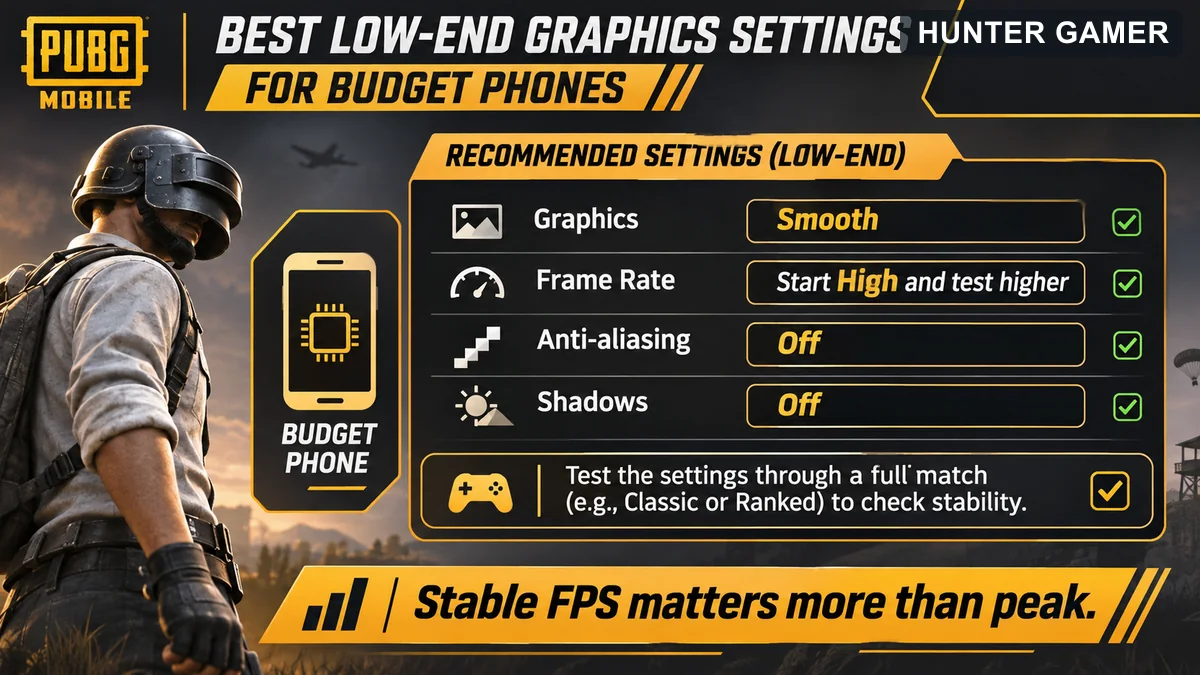
Budget phone PUBG Mobile checklist: Smooth graphics, start High frame rate and test stability, anti-aliasing and shadows off
  • Graphics: Smooth
  • Frame Rate: start at High. Try Ultra or Extreme only if the game stays smooth for a full match.
  • Style: Colorful or Realistic, whichever helps you spot enemies. This setting has very little performance cost.
  • Anti-aliasing: off
  • Shadows: off
  • Auto-adjust graphics: off, so the game does not change settings mid-match.

Also download only the resource packs you need. Removing extra map packs and HD packs frees storage and can help older phones load faster.

Still stuttering? Our full guide to fix PUBG lag covers phone-side fixes, storage cleanup and network checks step by step.

Mid and flagship settings

Mid-range phones (6GB-8GB RAM)

  • Graphics: Smooth for ranked, Balanced if you want a nicer look in casual games.
  • Frame Rate: Extreme, or 90 FPS if it appears.
  • Anti-aliasing: off or low.
  • Shadows: off for competitive play. Shadows can occasionally reveal enemies, but most players prefer the extra FPS.

Flagship phones and iPhones

  • Graphics: Smooth for the highest FPS options. On many phones, the 90 and 120 FPS choices only show with lower graphics settings.
  • Frame Rate: 90 FPS, or 120 FPS if supported.
  • Screen refresh rate: set your phone’s display to its highest refresh rate in system settings. A 60Hz screen cannot show 90 FPS.

Smoother frames make a real difference to your controls. If you are moving to a claw setup, pair these settings with our PUBG Mobile 4 finger claw controls code guide.

Fixing overheating and FPS drops

Here is the hard truth: when a phone gets hot, it slows its own chip to protect itself. This is called thermal throttling. No setting can remove it. You can only reduce the heat.
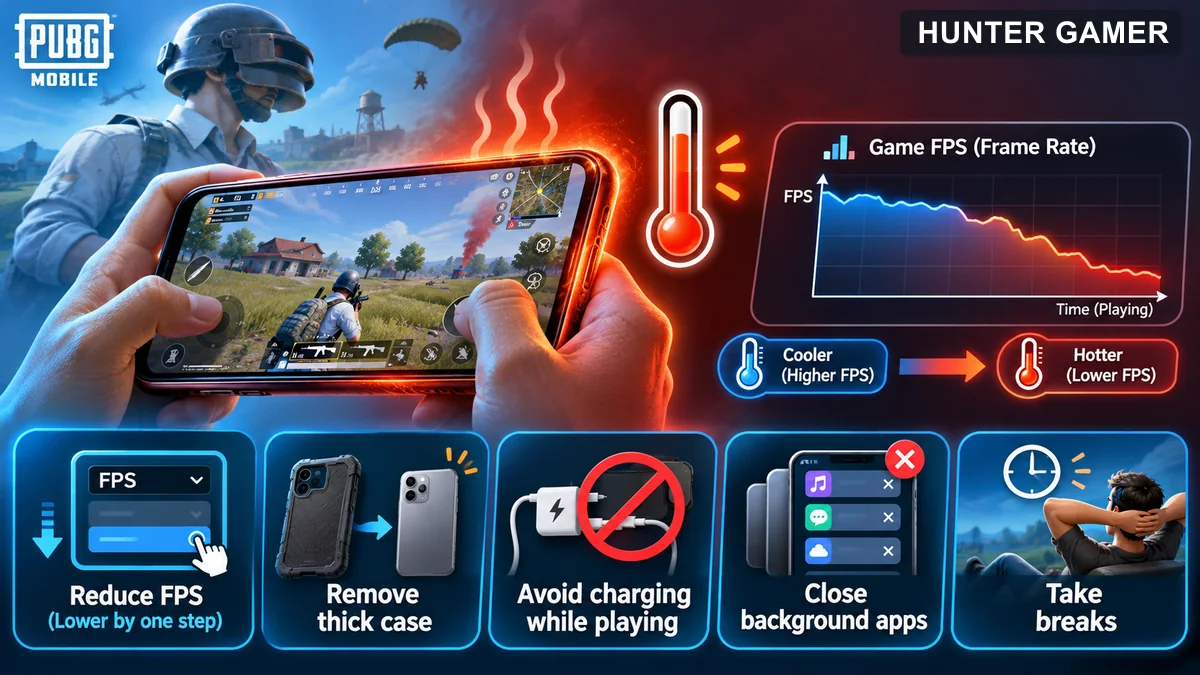
Diagram showing FPS dropping as phone heats and steps to reduce heat while gaming

Bangladesh’s hot, humid weather makes this worse. A phone that runs 90 FPS fine in an air-conditioned room may drop hard in a hot room in summer.

  1. Drop one FPS level. Going from 90 to Extreme often runs cooler and stays steadier over a full match.
  2. Take the case off. Thick cases trap heat.
  3. Do not play while charging. Charging and gaming together create a lot of heat.
  4. Lower screen brightness a little. The display uses a lot of power.
  5. Close background apps before you open the game.
  6. Use the phone’s game mode if it has one, to block notifications and limit background activity.
  7. Take breaks between matches so the phone can cool.

Phone cooling fans can help some phones, but results vary a lot. They are not a fix for a phone that is simply too weak for the setting you chose.

If your phone is the limit, PUBG on PC may be an option. Check our PUBG Mobile PC requirements guide to see what you need.

Ping tips for Bangladesh

High FPS with high ping still feels laggy. FPS is about your phone. Ping is about your connection to the game server.

  • Pick the Asia server in the lobby. It is usually the closest region for players in Bangladesh.
  • Use 5GHz Wi-Fi if your router supports it and you are close to it. 2.4GHz reaches further but is more crowded.
  • Stop downloads and streaming on the same network while you play.
  • Mobile data: 4G can work well, but signal strength changes from room to room. Play where your signal is strongest.
  • Restart your router if ping spikes suddenly. It is simple, but it often helps.

Be careful with “gaming VPN” apps that promise low ping. A VPN adds an extra stop between you and the server, so it usually makes ping worse, not better.

FAQ

Why does 90 FPS not show on my phone?

PUBG Mobile only shows 90 FPS on devices it supports. If the option is missing, your phone is not on the current list. Try lowering Graphics to Smooth, since some higher FPS options only appear at lower graphics. Avoid unlock files and GFX tools, which can risk your account.

Is Smooth plus Extreme the best setting?

For most phones without 90 FPS, Smooth plus Extreme is a popular competitive choice because it prioritizes frame rate over looks. If your phone overheats or drops frames on Extreme, step down to Ultra or High for steadier play.

Why does my FPS drop after 10 minutes?

Usually heat. When a phone gets hot, it slows its chip to protect itself. Lower one FPS level, remove the case, avoid playing while charging and close background apps. No setting can fully stop throttling on a phone that is pushed too hard.

Does a VPN reduce ping in Bangladesh?

Usually not. A VPN adds an extra stop between your phone and the game server, which tends to raise ping. Choose the Asia server, use strong Wi-Fi or mobile signal, and stop other downloads instead.
Published by

Hunter Gamer

Hunter Gamer has covered games, esports, and streamers for readers in Bangladesh and beyond since 2019. The site publishes gaming news and explainers, practical settings and troubleshooting guides for mobile and PC players, Bangladesh buying information for gaming hardware and digital products, and profiles of creators alongside their official channels.

Articles are built on official game, platform, and product information where it is available, and sources are linked when a claim needs attribution. Because prices, release dates, and game settings change, each article carries a review date and readers are asked to check the linked source before buying anything or changing an account setting. Where something cannot be verified, the article says so rather than guessing. Articles are revised when an error is found or when a change makes an older guide misleading — corrections and news tips are welcome through the contact page.

About Hunter GamerSpotted an error? Tell us

Previous Post

25 Best Valorant Crosshair Codes 2026 (Copy-Paste + How to Import)

Next Post

Free Fire Lag Fix 2026: 12 Working Fixes for 2GB/3GB RAM Phones

Related Posts

Illustration of a tilted phone above training targets with an amber rotation arrow.
Mobile Games

PUBG Mobile Gyroscope Not Working? 2026 Checklist

November 17, 2026
A golden footballer hologram rising from a smartphone screen toward a floating golden shield with a check mark.
Mobile Games

PUBG Mobile Account Recovery 2026: Choose the Right Option

November 16, 2026
Blue and amber blocks labeled Version 4.7, November 12, and Flash, November 13, 2026.
Mobile Games

PUBG Mobile 4.7 and Flash Release Dates: November 2026

November 16, 2026
Next Post
Older Android phone illustrating stuttering gameplay versus steadier gameplay after troubleshooting

Free Fire Lag Fix 2026: 12 Working Fixes for 2GB/3GB RAM Phones

Illustrative battle royale nameplates with different decorative symbol styles

500+ Free Fire Stylish Names 2026 (Copy-Paste Symbols + Name Change Guide)

Two unbranded budget phones showing mobile battle royale games beside a ৳20,000 budget sign

Best Gaming Phones Under 20,000 Taka in Bangladesh (2026): FF & PUBG Performance

Comments 1

  1. Pingback: PUBG Mobile Gyroscope Not Working? 2026 Checklist

Categories

  • Mobile Games
  • News
  • PC Games
  • PUBG
  • Reviews

Topics

2024 PUBG tricks Best Fortnite Xp Maps Best Games Cyberpunk Days Gone Fortnite Fortnite Xp Maps Gamer Lag fix PMPL 2023 South Asia PUBG PUBG game performance PUBG mobile lag fix PUBG Mobile Redeem Codes 2023 Xp Maps
  • Top-Up Shop
  • About Us
  • Contact
  • Privacy Policy and Data Protection
  • Terms and Conditions of Website Use
  • Refund and Returns Policy for Digital Products
Call us: +880 1711 189127

Copyright © 2020 - 2026 Hunter Gamer · All Rights Reserved.

Welcome Back!

Login to your account below

Forgotten Password?

Retrieve your password

Please enter your username or email address to reset your password.

Log In
No Result
View All Result
  • Shop
  • Home
  • Mobile Games
    • PUBG
  • PC Games
  • Reviews
  • News
  • Insights
  • Streamers
    • Australia
    • Bangladesh
    • Canada
    • Hong Kong
    • India
    • Indonesia
    • Malaysia
    • Moroccan
    • Nepal
    • Singapore
    • Spain
    • Taiwan
    • Thailand
    • Türkiye
    • United Kingdom
    • United States
    • Vietnam
  • Online Games
    • Dex Ball

Copyright © 2020 - 2026 Hunter Gamer · All Rights Reserved.