- Latest
- Trending
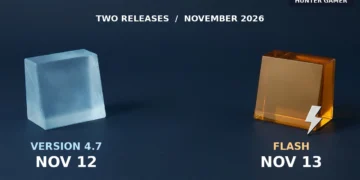
PUBG Mobile version 4.7 is scheduled for November 12, 2026. PUBG Mobile Flash is scheduled for November 13. These are two separate releases, not two dates for the same update. PUBG Mobile listed both in its November 9 announcement.
If you already play the main PUBG Mobile app, look for its 4.7 update. If you are interested in the separate Flash app, use the publisher’s official store link and check whether it is available for your device. A smaller initial download is a reason to investigate Flash, not a guarantee that your phone will run it faster.
By Hunter Gamer. Checked November 11, 2026, before both announced release dates. This is a launch-planning guide, not a hands-on review. The images are AI-generated symbolic editorial illustrations, not official game artwork or screenshots.
The distinction matters when you see a download button. A Flash pre-registration page is not the place to update your existing main-game installation. Likewise, a 4.7 beta link is a test-build link, not evidence that the final update has reached your phone.
The date announcement does not specify a worldwide release hour. We have not verified a Bangladesh-specific rollout time, so there is no reliable local countdown to give here. Check the relevant store listing rather than treating midnight as a confirmed launch time.
The publisher’s official Flash download link led to its Google Play listing during our check. That listing identifies the publisher as Level Infinite and describes a lighter initial download, with Erangel included and additional maps and modes available to download later.
That is a useful distinction for a phone with limited storage: the starting package and the collection of content you eventually install are not the same thing. If you later download more maps, do not expect the initial package size to describe your complete installation.
The listing also promotes optimized performance across more phones. Treat that as the publisher’s description, not our test result. We have not measured Flash’s frame rate, loading time, memory use or battery drain. We are not promising a particular FPS or a fix for lag.
For an existing player whose main app works well, our recommendation is to update that app first rather than uninstall it just to follow the Flash launch. If storage is your main problem, check Flash’s current compatibility and download information on your own device before deciding.
On Android, open Google Play, tap your profile icon, then Manage apps & device. Under Updates available, choose See details and look for PUBG Mobile. Tap Update if it is offered. These steps follow Google’s app-update instructions.
On iPhone or iPad, open the App Store, tap your account button or photo, then App Updates. Use Update beside PUBG Mobile if available, following Apple’s current instructions.
If the update is offered but will not download, use our PUBG Mobile Android download troubleshooting guide. That is a different problem from an update that is not yet offered to your device.
Start with the official Flash link above. Read the app name, publisher, compatibility message and current button on the store page. A pre-registration or wishlist option does not mean you can play immediately. Our web check did not establish availability for a Bangladesh account or a particular phone.
Do not substitute an APK from a comment, a shortened link from an unknown account or a file described as a performance-unlock build. The publisher already supplies an official route; there is no need to trust an unrelated upload.
No. The publisher’s November 9 announcement lists November 12 for version 4.7 and November 13 for Flash. Both dates are in 2026.
The official Google Play listing reached through the publisher’s link says Erangel comes pre-installed and additional maps and modes can be downloaded later. Do not confuse the initial download with all optional content.
Google says an Update button appears on an app’s details page when an update is available. Check the correct PUBG Mobile listing. The publisher’s date announcement alone does not establish when your particular device will receive it.
No device-specific guarantee is established by the store listing’s performance description. We have not benchmarked Flash. Check compatibility first, then judge it on your own device rather than expecting a promised frame-rate increase.