• Latest
  • Trending
  • All
Illustrative Free Fire redemption card with blank code and reminder to check official source and account eligibility

Free Fire Redeem Codes Today Bangladesh: Honest BD Guide

November 16, 2026

Steam Verify Game Files: Repair Checklist (2026)

November 25, 2026
Illustration of a phone displaying a miniature football pitch beside a wireless gamepad, with blue connection arcs.

eFootball Mobile Controller Support: Setup Guide (2026)

November 24, 2026
Stylized illustration of game blocks moving between two storage drives on a navy platform.

How to Move Steam Games to Another Drive (2026)

November 23, 2026
Illustration of two phones linked by orange sound waves on a tropical squad-game terrain model.

Free Fire Mic Not Working? Voice Chat Checklist (2026)

November 22, 2026
Symbolic illustration of an Android phone reviewing optional PUBG Mobile resource downloads

PUBG Mobile Storage: Remove Unused Resources (2026)

November 21, 2026
Illustration of gameplay frames looping beside a monitor, with one frame saved to a video tile.

OBS Replay Buffer Guide: Save Gaming Clips in 2026

November 21, 2026
Symbolic comparison of different local and cloud save copies on two computers

Steam Cloud Conflict: Which Save Should You Keep? (2026)

November 21, 2026
Symbolic control layout receiving a share code that repositions its buttons

Free Fire HUD Share Code: Import and Setup Guide (2026)

November 21, 2026
Illustration of a tilted phone above training targets with an amber rotation arrow.

PUBG Mobile Gyroscope Not Working? 2026 Checklist

November 17, 2026
A curved gaming monitor showing a colorful game scene with a glowing timeline bar below it, one segment highlighted in gold.

Steam Game Recording Guide 2026: Save and Export Clips

November 17, 2026
Two smartphones moving a glowing stream with a soccer ball from the old phone to the new phone under stadium lights.

eFootball Mobile Data Transfer: New Phone Guide (2026)

November 16, 2026
A smartphone wrapped in a glowing orange energy dome with a chain of light linking it to a floating shield emblem.

How to Bind a Free Fire Guest Account Safely in 2026

November 16, 2026
  • About Hunter Gamer
  • Advertising & Sponsorship Opportunities
  • Contact Us for Gaming News & Support
Saturday, November 28, 2026
  • Login
Hunter Gamer
  • Shop
  • Home
  • Mobile Games
    • PUBG
  • PC Games
  • News
  • Insights
  • Streamers
    • Australia
    • Bangladesh
    • Canada
    • Hong Kong
    • India
    • Indonesia
    • Malaysia
    • Moroccan
    • Nepal
    • Singapore
    • Spain
    • Taiwan
    • Thailand
    • Türkiye
    • United Kingdom
    • United States
    • Vietnam
  • Online Games
    • Dex Ball

No products in the cart.

No Result
View All Result
Hunter Gamer
  • Shop
  • Home
  • Mobile Games
    • PUBG
  • PC Games
  • News
  • Insights
  • Streamers
    • Australia
    • Bangladesh
    • Canada
    • Hong Kong
    • India
    • Indonesia
    • Malaysia
    • Moroccan
    • Nepal
    • Singapore
    • Spain
    • Taiwan
    • Thailand
    • Türkiye
    • United Kingdom
    • United States
    • Vietnam
  • Online Games
    • Dex Ball
No Result
View All Result
Hunter Gamer
No Result
View All Result

Free Fire Redeem Codes Today Bangladesh: Honest BD Guide

November 16, 2026
in Mobile Games
Reading Time: 6 mins read
0 0
Home Mobile Games
19
VIEWS
Share on FacebookShare on Twitter

If you searched for free fire redeem codes today Bangladesh, you probably want a reward, not another page of expired codes. Fair enough. A fresh headline does not make a code usable: expiration, redemption limits and account region still decide what happens.

This guide will not paste a code list and pretend it stays current. Instead, here is the reliable route: check official sources, use Garena’s redemption site, confirm the receiving account and understand the result. That is more useful than another working-codes thumbnail when you are checking between classes in Dhaka or Chattogram.

Where to look for today’s Free Fire codes

Start with Garena’s official Free Fire news page and the events inside your game. These are the places to check for legitimate code drops. There is no verified release schedule here, so do not plan around a promised daily drop time from a random post.

Finding a code through an official announcement still does not mean every Bangladesh account can redeem it. Codes expire and are region-locked, and the redemption site can also report that a redemption limit has been exceeded. Read the accompanying information before trying it.

For background, Free Fire is Garena’s free-to-play battle royale on Android and iOS. For redemption decisions, though, use the official notices and the response shown on your account, not a general game overview or someone else’s successful redemption.

How to use the official Rewards Redemption Site

Open Garena’s Rewards Redemption Site at reward.ff.garena.com. Keep the address in mind when moving between code posts and the actual redemption page. A page discussing rewards is not the same thing as the official place to claim them.
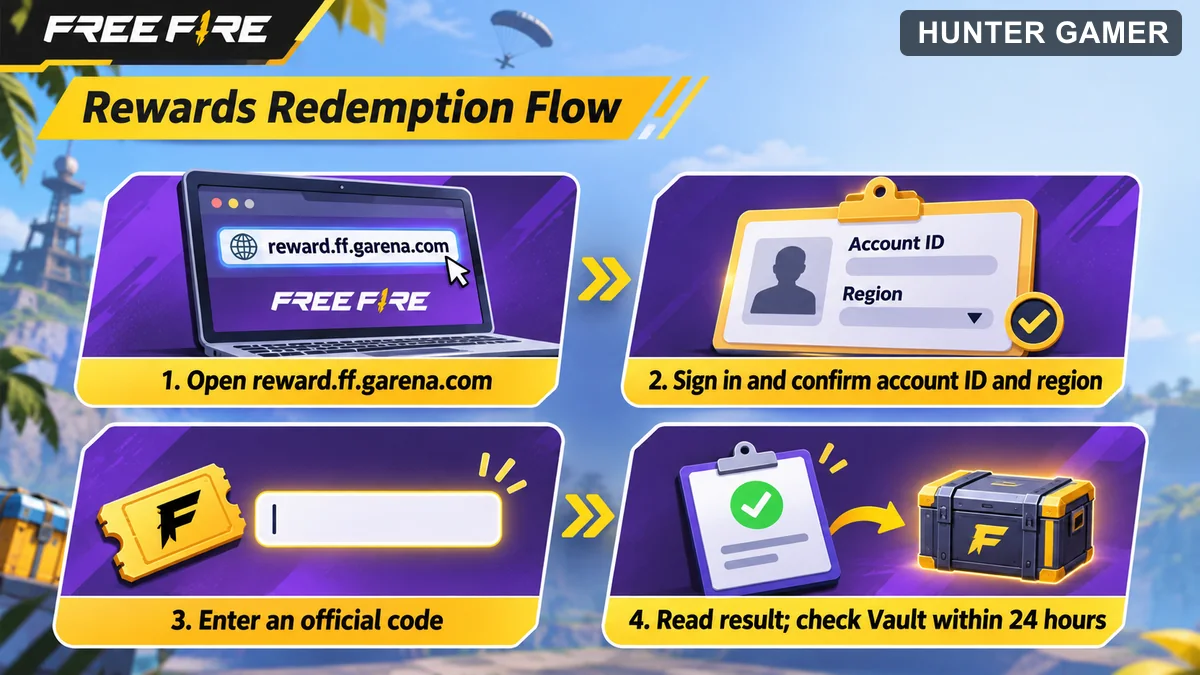
Four-step diagram: official reward.ff.garena.com site, confirm account ID and region, enter official code, read result and check Vault within 24 hours
  1. Log in using Facebook, VK, Google or Apple. Use the login connected to the game account where you want the reward, rather than rushing through with whichever account appears first.
  2. Select your game version when the site asks you to do so. This is part of the login flow, not a detail to skip because you recognise the Free Fire name.
  3. Confirm your login details. Check the displayed ID and region before continuing. If the ID is not the account you intend to use, stop and correct the login.
  4. Enter the code from the legitimate source. Official codes consist of capital letters and numbers. Check your entry against the source instead of guessing missing characters or changing the code.
  5. Look for Successfully Redeemed. That is the official success result. An error message means you need to read the reason; pressing the button again does not turn it into confirmation.
  6. Allow delivery within 24 hours. Check the Vault tab in the game lobby for item rewards. Gold or diamonds are added to the account wallet automatically.

Keep the distinction between accepting a code and delivering its reward clear. The success notice says the reward will be sent within 24 hours. You do not need to treat an item missing immediately after redemption as proof that the code failed.

The guest-account trap: fix it before redeeming

Guest accounts cannot redeem rewards. Garena’s notice explicitly says this and directs guest players to bind their account to Facebook or VK to receive rewards. If you are still playing as a guest, deal with that before chasing the next announcement.
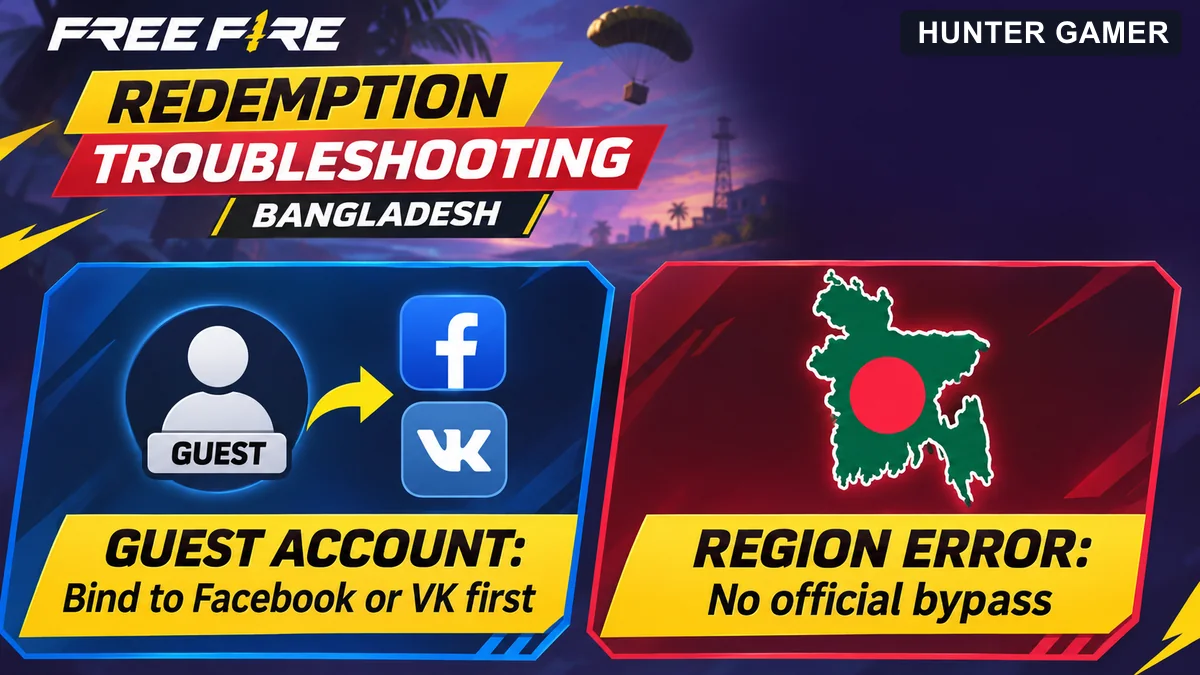
Diagram showing guest accounts should bind to Facebook or VK before redemption and region-locked codes have no official bypass

Notice the difference between the login menu and the guest-account instruction. The site offers Facebook, VK, Google and Apple login buttons, but the official notice specifically names Facebook or VK for binding a guest account. Do not read the broader login menu as a replacement for that instruction.

On a budget Android phone, it is tempting to rush straight from an event to the claim page. Pause at the account check. An account that cannot redeem is not something a newer code list will repair.

Bangladesh region errors are not a puzzle to bypass

Your account region appears during the login confirmation step. Codes are restricted by region, and there is no official way to redeem outside your region. A code working for someone elsewhere does not establish that it was released for your account’s region.

If the site says the code cannot be used in your region, it was not released for your region. Look for an appropriate official drop instead. The separate wrong-region notice directs users to the main reward.ff.garena.com address; that redirect is not an exception to the restriction.

Official redemption errors and what to do

Read the message before changing anything. These official responses describe different problems, so they should not all get the same advice to keep trying.

Official messageWhat it meansWhat to do
The code has been redeemed.The site reports that the code has already been redeemed.Stop treating it as an unused code. Check official sources for another eligible drop.
Failed to redeem. This code is expired.The redemption period has ended.Move on. Official notices say expired codes cannot be redeemed.
The code can’t be used in your region. Please check again or contact the customer service.The code is not for your account region.Check the region shown at login. Follow the customer-service direction if you need clarification; there is no official bypass.
Failed to redeem. You have exceeded the redemption limit.The site reports that the redemption limit has been exceeded.Do not assume repeated submissions will fix it. Look for another eligible official code.
Action too frequently. Please try again later.The site is asking you to slow down.Stop submitting and try later. The message gives no exact waiting period.

Other responses need their own fixes. If your session has expired, log in again. If the site asks you to log in to the game and create a character, follow that instruction. For the invalid-or-redeemed response, compare your entry with its source and read our Free Fire invalid redemption code error guide rather than assuming every failure is a region problem.

A better routine than refreshing stale lists

Check official news and in-game events, confirm account eligibility, then redeem through Garena. If diamonds are your main goal, keep our guide to getting free diamonds in Free Fire separate from promises attached to an unverified code post.

Playing another mobile battle royale too? Our PUBG Mobile redeem codes article covers a different game, not Free Fire redemption instructions. For your Free Fire account, the useful result is official confirmation, not how confidently a headline says today.

Frequently asked questions

Can I redeem Free Fire rewards with a guest account?

No. The official redemption notice says guest accounts cannot redeem rewards. It tells you to bind your account to Facebook or VK to receive them. Do that before attempting redemption, then check the ID displayed on the redemption site so you are using the intended game account.

How long does a redeemed Free Fire reward take to arrive?

The official success notice says rewards will be sent to your account within 24 hours. Item rewards appear in the Vault tab in the game lobby, while gold or diamonds are added to your account wallet automatically. Check the Vault tab 24 hours after redemption rather than assuming immediate delivery.

Why does a Free Fire code show a region error in Bangladesh?

Codes are region-locked, and your account region is shown when you confirm your login details. A message saying the code cannot be used in your region means it was not released for your region. There is no official way around that restriction; check official sources for a code intended for your region.

What should I select for Free Fire versus Free Fire MAX?

The redemption site asks you to select your game version during login. Choose the version you play, then confirm the displayed account ID and region before entering a code. Garena’s official Free Fire website links store listings for both Free Fire and Free Fire MAX; do not skip the version selection.
Published by

Hunter Gamer

Hunter Gamer has covered games, esports, and streamers for readers in Bangladesh and beyond since 2019. The site publishes gaming news and explainers, practical settings and troubleshooting guides for mobile and PC players, Bangladesh buying information for gaming hardware and digital products, and profiles of creators alongside their official channels.

Articles are built on official game, platform, and product information where it is available, and sources are linked when a claim needs attribution. Because prices, release dates, and game settings change, each article carries a review date and readers are asked to check the linked source before buying anything or changing an account setting. Where something cannot be verified, the article says so rather than guessing. Articles are revised when an error is found or when a change makes an older guide misleading — corrections and news tips are welcome through the contact page.

About Hunter GamerSpotted an error? Tell us

Previous Post

Kick Streaming in Bangladesh: Your Practical 2026 Guide

Next Post

BGMI 3.9 Update Download: Old Version, Safe Update Guide

Related Posts

Illustration of a phone displaying a miniature football pitch beside a wireless gamepad, with blue connection arcs.
Mobile Games

eFootball Mobile Controller Support: Setup Guide (2026)

November 24, 2026
Illustration of two phones linked by orange sound waves on a tropical squad-game terrain model.
Mobile Games

Free Fire Mic Not Working? Voice Chat Checklist (2026)

November 22, 2026
Symbolic control layout receiving a share code that repositions its buttons
Mobile Games

Free Fire HUD Share Code: Import and Setup Guide (2026)

November 21, 2026
Next Post
Archived BGMI 3.9 Transformers-themed update contrasted with updating through an official app source

BGMI 3.9 Update Download: Old Version, Safe Update Guide

Fictional Bangladeshi mobile esports squad at a tournament stage, illustrating team competition

Best Free Fire Players in Bangladesh: Who Leads in 2026?

Illustrated Roblox creator workshop showing building and avatar-item creation as legitimate earning work, with free generator crossed out

How to Get Free Robux in 2026: Legit Ways Without Scams

Comments 3

  1. Pingback: How to Get Free Robux in 2026: Legit Ways Without Scams
  2. Pingback: Free Fire Storm Arena 2026: Free Rewards and What to Check
  3. Pingback: How to Bind a Free Fire Guest Account Safely in 2026

Leave a Reply Cancel reply

Your email address will not be published. Required fields are marked *

Categories

  • Mobile Games
  • News
  • PC Games
  • PUBG
  • Reviews

Topics

2024 PUBG tricks Best Fortnite Xp Maps Best Games Fortnite Fortnite Xp Maps Gamer Lag fix PMPL 2023 South Asia PUBG PUBG game performance PUBG mobile lag fix Xp Maps
  • Top-Up Shop
  • About Us
  • Contact
  • Privacy Policy and Data Protection
  • Terms and Conditions of Website Use
  • Refund and Returns Policy for Digital Products
Call us: +880 1711 189127

Copyright © 2020 - 2026 Hunter Gamer · All Rights Reserved.

Welcome Back!

Login to your account below

Forgotten Password?

Retrieve your password

Please enter your username or email address to reset your password.

Log In
No Result
View All Result
  • Shop
  • Home
  • Mobile Games
    • PUBG
  • PC Games
  • News
  • Insights
  • Streamers
    • Australia
    • Bangladesh
    • Canada
    • Hong Kong
    • India
    • Indonesia
    • Malaysia
    • Moroccan
    • Nepal
    • Singapore
    • Spain
    • Taiwan
    • Thailand
    • Türkiye
    • United Kingdom
    • United States
    • Vietnam
  • Online Games
    • Dex Ball

Copyright © 2020 - 2026 Hunter Gamer · All Rights Reserved.