• Latest
  • Trending
  • All
Illustrative voxel cave scene with a right-side hiss caption cue near a hidden creature

How to Enable Subtitles in Minecraft Java Edition and Read Sound Direction Cues

November 4, 2026
Editorial game illustration of Fade's watcher marking opponents and a Prowler following a Terror Trail

Fade Valorant Character Profile: Role, Abilities, and Beginner Tips

November 6, 2026
Editorial illustration of separate voice, game and combined audio recordings on translucent tapes

OBS Separate Audio Tracks: Record Your Mic and Game Audio for Stream Highlights

November 6, 2026
Editorial microphone and audio meter with a physical stop marking the output ceiling

OBS Microphone Limiter Settings: Control Loud Voice Peaks in Gaming Streams

November 6, 2026
Editorial game illustration of a cybernetic forearm sending a seismic pulse through a wall as a teammate waits

Breach Valorant Character Profile: Role, Abilities and Teamplay Basics

November 6, 2026
Editorial game illustration of a nature-inspired scout sending a hawk and animal ahead while teammates receive healing under cover

Skye Valorant Character Profile: Role, Abilities and Teamplay Basics

November 6, 2026
Editorial illustration of a desktop notification being copied from a gaming display into a public stream

How to Keep Desktop Notifications Off Your Gaming Stream in OBS

November 6, 2026
Editorial router and game controller beside an observational graph with fluctuating connection peaks

VALORANT Network Stats Settings: Check Ping Spikes and Connection Jitter

November 6, 2026
Editorial audio mixer with game-sound level lowering while microphone speech rises

OBS Audio Ducking: Lower Game Sound Automatically While You Talk

November 6, 2026
Two mobile game scenes comparing a large battle royale island with a compact multiplayer arena

Call of Duty: Mobile Overview for PUBG Players: Modes, Loadouts, and What to Try

November 6, 2026
Microphone shielded from PC fan noise by a soft acoustic boundary

OBS Microphone Noise Suppression: Reduce Fan Noise in Gaming Streams

November 6, 2026
Illustration of recent practice shots with a shooting-error trace

VALORANT Shooting Error Graph: What It Shows and How to Use It

November 6, 2026
Slow mode, blocked-word filter and human moderation illustrated as a chat flow

YouTube Gaming Live Chat Moderation: Slow Mode, Blocked Words and Moderators

November 6, 2026
  • About Hunter Gamer
  • Advertising & Sponsorship Opportunities
  • Contact Us for Gaming News & Support
Monday, November 9, 2026
  • Login
Hunter Gamer
  • Shop
  • Home
  • Mobile Games
    • PUBG
    • Fortnite
  • PC Games
  • Reviews
  • News
  • Insights
  • Streamers
    • Australia
    • Bangladesh
    • Canada
    • Hong Kong
    • India
    • Indonesia
    • Malaysia
    • Moroccan
    • Nepal
    • Singapore
    • Spain
    • Taiwan
    • Thailand
    • Türkiye
    • United Kingdom
    • United States
    • Vietnam
  • Online Games
    • Dex Ball

No products in the cart.

No Result
View All Result
Hunter Gamer
  • Shop
  • Home
  • Mobile Games
    • PUBG
    • Fortnite
  • PC Games
  • Reviews
  • News
  • Insights
  • Streamers
    • Australia
    • Bangladesh
    • Canada
    • Hong Kong
    • India
    • Indonesia
    • Malaysia
    • Moroccan
    • Nepal
    • Singapore
    • Spain
    • Taiwan
    • Thailand
    • Türkiye
    • United Kingdom
    • United States
    • Vietnam
  • Online Games
    • Dex Ball
No Result
View All Result
Hunter Gamer
No Result
View All Result

How to Enable Subtitles in Minecraft Java Edition and Read Sound Direction Cues

November 4, 2026
in News
Reading Time: 3 mins read
0 0
Home News
12
VIEWS
Share on FacebookShare on Twitter

Yes — Minecraft Java Edition has subtitles (the game calls them Closed Captions), and you can turn them on in under a minute. They show the name of every nearby sound as text, with markers that tell you which direction the sound came from. Here is the exact way to enable them, as shown on Mojang’s official accessibility guide (checked October 2026).

How to turn on subtitles in Minecraft Java Edition

Follow these steps in the game:

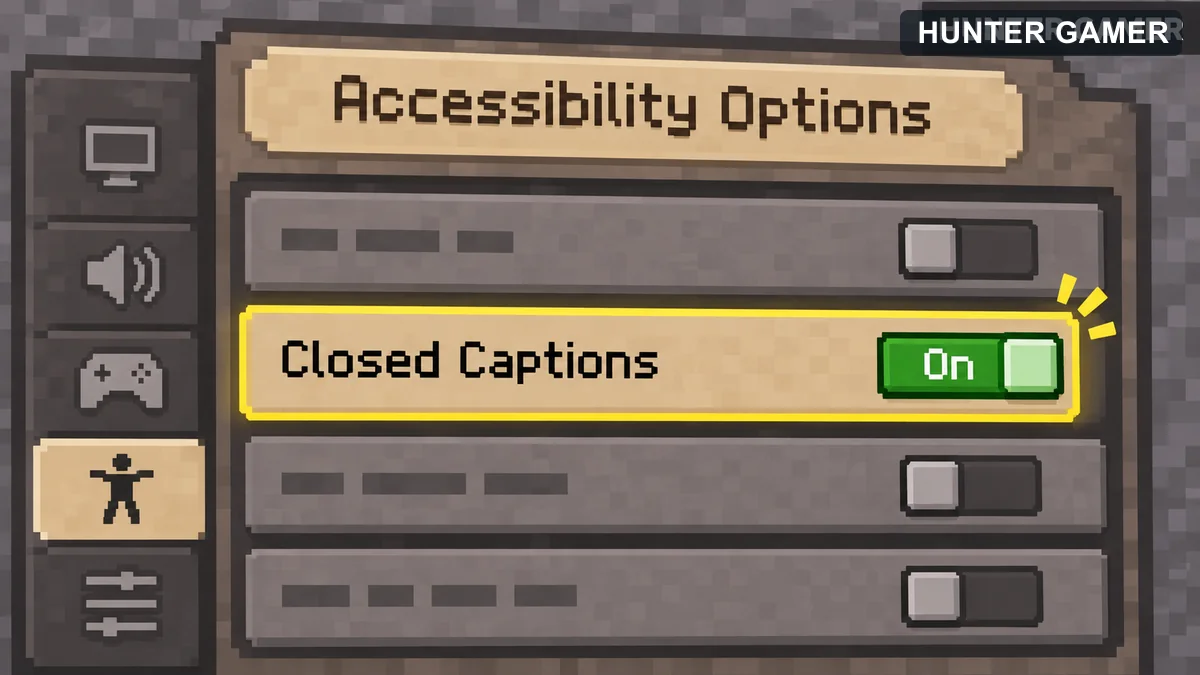
Illustrative accessibility setting with Closed Captions switched on
  • Open Options from the title screen, or the pause menu while you are in a world.
  • Select Accessibility Settings. You can also reach it through the Accessibility icon on the title screen.
  • Find the Closed Captions option and switch it to ON.

Mojang’s official help page describes this setting as displaying “messages describing the type and direction of sounds as text onscreen”. In Java Edition you can also find the same toggle under Options → Music & Sounds, so both menus work.

How to read the sound direction cues

Once captions are on, a small text box appears at the bottom-right corner of the screen. Every sound close enough to matter gets its own line, and the text slowly fades as the sound fades. The direction markers work like this:
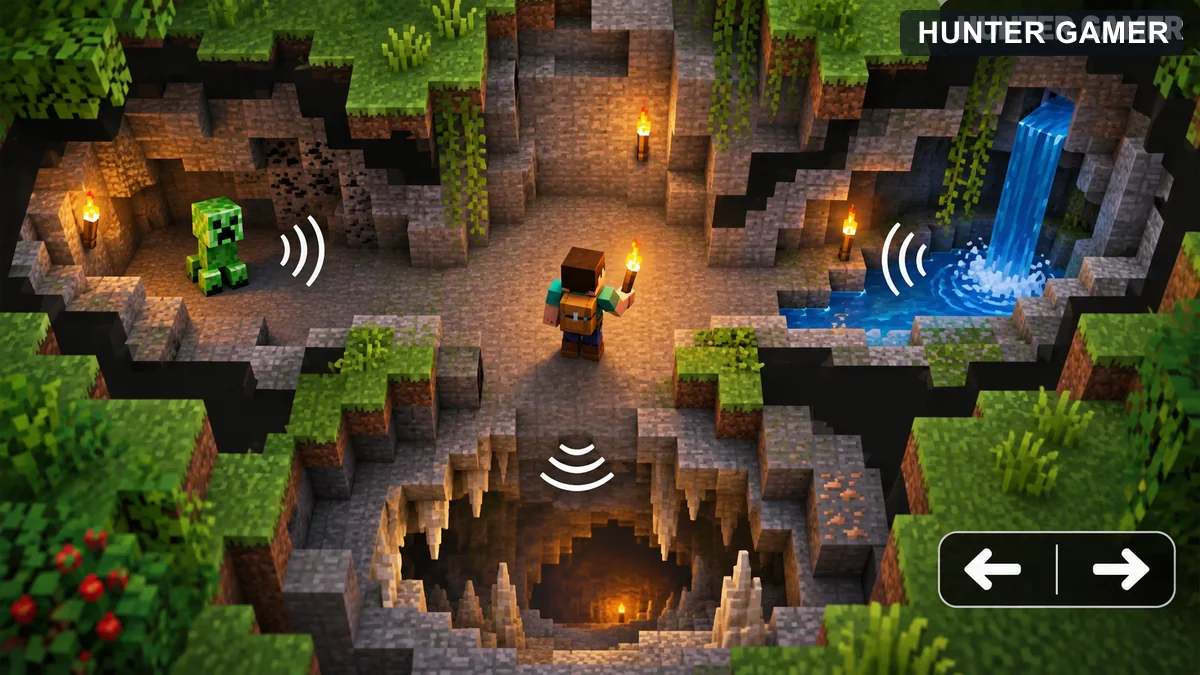
Top-down voxel cave showing nearby sounds to the left and right of an explorer
  • < means the sound is coming from your left.
  • > means the sound is coming from your right.
  • No arrow means the sound is directly around you — for example, right behind a wall or underneath your feet.

This is why captions help in survival worlds: you can “see” a creeper hissing behind you, a skeleton rattling in a cave below, or a zombie groaning outside your door without turning the volume up.

Why subtitles are useful even with good hearing

Captions were added as an accessibility feature for deaf and hard-of-hearing players, but many players use them to catch quiet or unfamiliar sounds — footsteps in caves, chests, or mobs near a base. They also help when you play with the sound low or off, for example when everyone else in the house is asleep.

Frequently asked questions

Is there a subtitle option in Minecraft Java Edition?

Yes. Java Edition has supported captions for years, and the official accessibility page lists “captions” as a Java Edition feature. The toggle is called Closed Captions in current versions.

Do subtitles show for every sound?

They cover sounds near your player. Very distant sounds do not appear — captions only list sounds that are close enough to be audible in your world.

Can I move or resize the caption box?

In Java Edition the caption box stays at the bottom-right corner of the screen. Extra caption options, like moving the box or hiding your own sounds, are available in Bedrock Edition instead.

For more player guides — including how to safely top up games like Free Fire and PUBG Mobile through official channels — visit our game top-up guides hub.
Previous Post

Valorant HRTF Audio Settings: How to Hear Footstep Direction More Clearly

Next Post

YouTube Mobile Live Streaming Requirements: A Guide for Gaming Streamers in Bangladesh

Related Posts

Editorial game illustration of Fade's watcher marking opponents and a Prowler following a Terror Trail
News

Fade Valorant Character Profile: Role, Abilities, and Beginner Tips

November 6, 2026
Editorial illustration of separate voice, game and combined audio recordings on translucent tapes
News

OBS Separate Audio Tracks: Record Your Mic and Game Audio for Stream Highlights

November 6, 2026
Editorial microphone and audio meter with a physical stop marking the output ceiling
News

OBS Microphone Limiter Settings: Control Loud Voice Peaks in Gaming Streams

November 6, 2026
Next Post
Illustration of a phone broadcast with separate channel verification, age and restriction checks

YouTube Mobile Live Streaming Requirements: A Guide for Gaming Streamers in Bangladesh

Conceptual illustration of game scene rendering through parallel CPU work lanes

VALORANT Multithreaded Rendering: When to Turn It On or Off

Illustration of a fictional healer Sentinel with a healing orb and protective wall

Sage in Valorant: Character Profile, Role and Abilities Explained

Categories

  • Mobile Games
  • News
  • PC Games
  • PUBG
  • Reviews
  • Xbox One

Topics

2024 PUBG tricks Best Fortnite Xp Maps Best Games Browser Cyberpunk Days Gone Fortnite Fortnite Xp Maps Gamer Lag fix Offer PMPL 2023 South Asia PUBG PUBG game performance PUBG mobile lag fix PUBG Mobile Redeem Codes 2023 X-Box Xp Maps
  • Top-Up Shop
  • About Us
  • Contact
  • Privacy Policy and Data Protection
  • Terms and Conditions of Website Use
  • Refund and Returns Policy for Digital Products
Call us: +880 1711 189127

Copyright © 2020 - 2026 Hunter Gamer · All Rights Reserved.

Welcome Back!

Login to your account below

Forgotten Password?

Retrieve your password

Please enter your username or email address to reset your password.

Log In
No Result
View All Result
  • Shop
  • Home
  • Mobile Games
    • PUBG
    • Fortnite
  • PC Games
  • Reviews
  • News
  • Insights
  • Streamers
    • Australia
    • Bangladesh
    • Canada
    • Hong Kong
    • India
    • Indonesia
    • Malaysia
    • Moroccan
    • Nepal
    • Singapore
    • Spain
    • Taiwan
    • Thailand
    • Türkiye
    • United Kingdom
    • United States
    • Vietnam
  • Online Games
    • Dex Ball

Copyright © 2020 - 2026 Hunter Gamer · All Rights Reserved.