• Latest
  • Trending
  • All
Side-by-side three-finger phone and five-finger large-screen PUBG Mobile claw touch-zone diagrams

PUBG Mobile 5 Finger Layout Code & 3 Finger Codes 2026 (Copy-Paste + Setup Guide)

November 16, 2026
A translucent cloud holding amber glass save tiles sits apart from a laptop holding cyan glass save tiles, connected by a thin line of light.

Steam Cloud Conflict: Which Save Should You Keep? (2026)

November 19, 2026
Symbolic illustration of floating glass control panels with gold and orange buttons above a landscape phone.

Free Fire HUD Share Code: Import and Setup Guide (2026)

November 19, 2026
Illustration of a tilted phone above training targets with an amber rotation arrow.

PUBG Mobile Gyroscope Not Working? 2026 Checklist

November 17, 2026
A curved gaming monitor showing a colorful game scene with a glowing timeline bar below it, one segment highlighted in gold.

Steam Game Recording Guide 2026: Save and Export Clips

November 17, 2026
Two smartphones moving a glowing stream with a soccer ball from the old phone to the new phone under stadium lights.

eFootball Mobile Data Transfer: New Phone Guide (2026)

November 16, 2026
A smartphone wrapped in a glowing orange energy dome with a chain of light linking it to a floating shield emblem.

How to Bind a Free Fire Guest Account Safely in 2026

November 16, 2026
A golden footballer hologram rising from a smartphone screen toward a floating golden shield with a check mark.

PUBG Mobile Account Recovery 2026: Choose the Right Option

November 16, 2026
valorant settings guide hero

VALORANT Settings Guide: Seven Options Worth Checking

November 16, 2026
Five glowing crystal obelisks in different colors on a dark arena floor.

VALORANT Agent Profiles: All Abilities, Roles and How to Play Them

November 16, 2026
Blue and amber blocks labeled Version 4.7, November 12, and Flash, November 13, 2026.

PUBG Mobile 4.7 and Flash Release Dates: November 2026

November 16, 2026
Editorial illustration of a stylized game profile screen with an ornamental nickname banner made of star and bracket symbols above a stat panel.

PUBG Mobile Name Symbols 2026: What Works and How to Change Your Name

November 16, 2026
Editorial illustration of a rugged metal supply capsule descending by parachute onto a rocky island as a storm and distant lightning gather over the sea.

Free Fire Storm Arena 2026: Free Rewards and What to Check

November 16, 2026
  • About Hunter Gamer
  • Advertising & Sponsorship Opportunities
  • Contact Us for Gaming News & Support
Friday, November 20, 2026
  • Login
Hunter Gamer
  • Shop
  • Home
  • Mobile Games
    • PUBG
  • PC Games
  • Reviews
  • News
  • Insights
  • Streamers
    • Australia
    • Bangladesh
    • Canada
    • Hong Kong
    • India
    • Indonesia
    • Malaysia
    • Moroccan
    • Nepal
    • Singapore
    • Spain
    • Taiwan
    • Thailand
    • Türkiye
    • United Kingdom
    • United States
    • Vietnam
  • Online Games
    • Dex Ball

No products in the cart.

No Result
View All Result
Hunter Gamer
  • Shop
  • Home
  • Mobile Games
    • PUBG
  • PC Games
  • Reviews
  • News
  • Insights
  • Streamers
    • Australia
    • Bangladesh
    • Canada
    • Hong Kong
    • India
    • Indonesia
    • Malaysia
    • Moroccan
    • Nepal
    • Singapore
    • Spain
    • Taiwan
    • Thailand
    • Türkiye
    • United Kingdom
    • United States
    • Vietnam
  • Online Games
    • Dex Ball
No Result
View All Result
Hunter Gamer
No Result
View All Result

PUBG Mobile 5 Finger Layout Code & 3 Finger Codes 2026 (Copy-Paste + Setup Guide)

November 16, 2026
in Mobile Games, PUBG
Reading Time: 8 mins read
0 0
Home Mobile Games
603
VIEWS
Share on FacebookShare on Twitter

Looking for a PUBG Mobile 5 finger layout code or a simpler 3 finger layout code? A layout code is a share ID that imports someone else’s full HUD in a few seconds. It is a starting point. You still have to fit it to your screen size and your hands.

Every code below comes from community guides. None is a secret pro file, and we have not tested them in-game ourselves. Layout codes can stop working after a game update or once the uploader deletes their slot. Take a screenshot of your current HUD before you import anything.

Reality check: you do not need 5 fingers

Here is the honest truth: more fingers does not automatically mean a better player. Many strong players use three or four fingers. Five fingers only helps when each extra finger has a clear job, such as peeking, jumping or crouching, that you would otherwise do with your aiming thumb.

The learning curve is real. Our 4 finger claw guide cites estimates of 3-4 days for basics and 2-3 weeks for ranked comfort, and that is only for four fingers. Expect five or six fingers to take longer, and expect your results to drop at first.

  • 2 thumbs: fine for casual play, but you cannot aim, move and shoot at the same time.
  • 3 fingers: the sweet spot for most phone players. Easy to learn, with a big upgrade over thumbs.
  • 4 fingers: the ranked standard once 3 fingers feels natural.
  • 5-6 fingers: mostly for large phones and tablets. Do not start here.

How to import a layout code

  1. Screenshot your current HUD. Go to Settings → Customize Buttons → Customize.
  2. Open Layout Management with the search/cloud icon. To get a rollback code, share your current layout first, then pick a spare slot.
  3. Choose Search Method and paste the full code, hyphens included.
  4. Tap Search → Apply → Save. Applying overwrites whichever slot you selected.
  5. Use Quick Copy to send the layout from Classic TPP to FPP. Arena has its own layouts, so repeat the steps there.

A layout code changes button placement only. It does not touch Camera, ADS or Gyroscope sensitivity, which use a separate code. See our sensitivity code guide for how those work.

PUBG Mobile 3 finger layout code

To be straight with you: the August 2026 BitTopup layout guide we rely on covers 4 to 6 finger setups. We did not find a 3 finger PUBG Mobile global code we could stand behind, so we are not printing a random string from the internet.
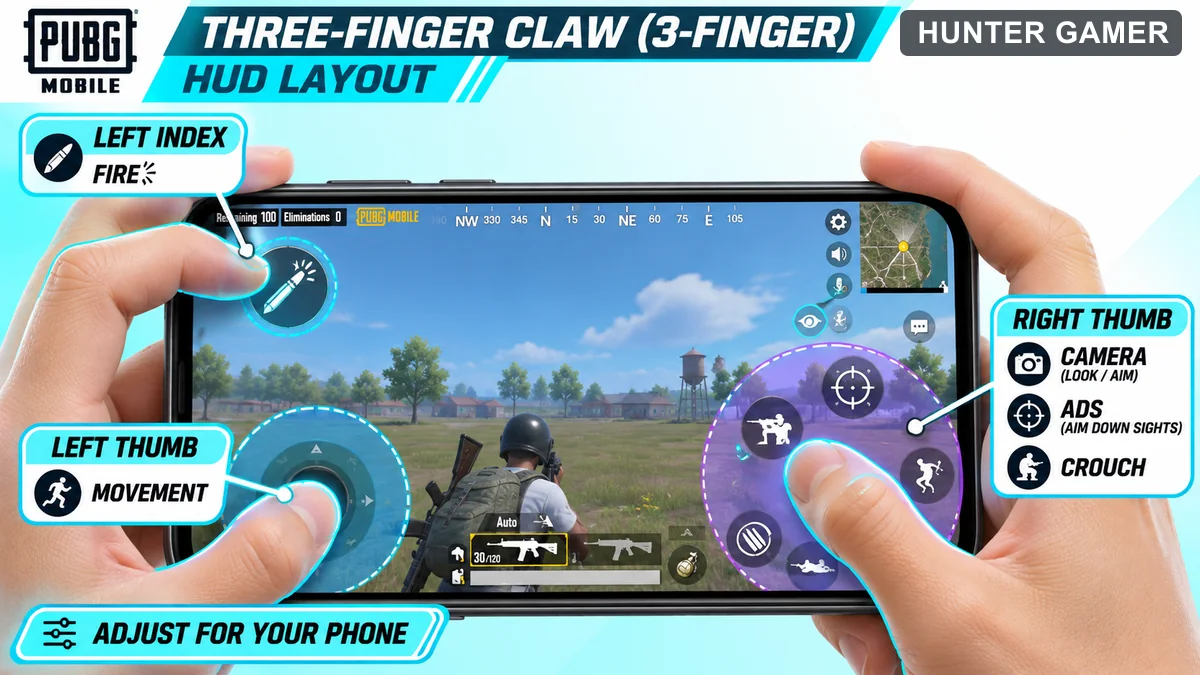
Three-finger HUD with left thumb movement, left index fire and right thumb camera, ADS and crouch

The reliable way is to start from the most imported claw code and remove one finger’s job:

  • 6974-6998-1946-2820-026: default ranked phone HUD, which the August 2026 BitTopup guide calls the most imported four-finger code of 2026.

After importing it, rearrange it for three fingers:

  • Left thumb: movement joystick.
  • Left index: the top-left fire button, set to 120-140% size.
  • Right thumb: camera, with ADS, crouch and prone moved within easy thumb reach.

Then save the result to your own slot and share it. Now you have a 3 finger code that fits your phone.

PUBG Mobile 5 finger claw code

A 5 finger claw keeps the usual four-finger setup and adds a second right-hand finger, normally the middle or ring finger. That finger takes peek, jump or scope, so your right thumb never has to leave the camera.
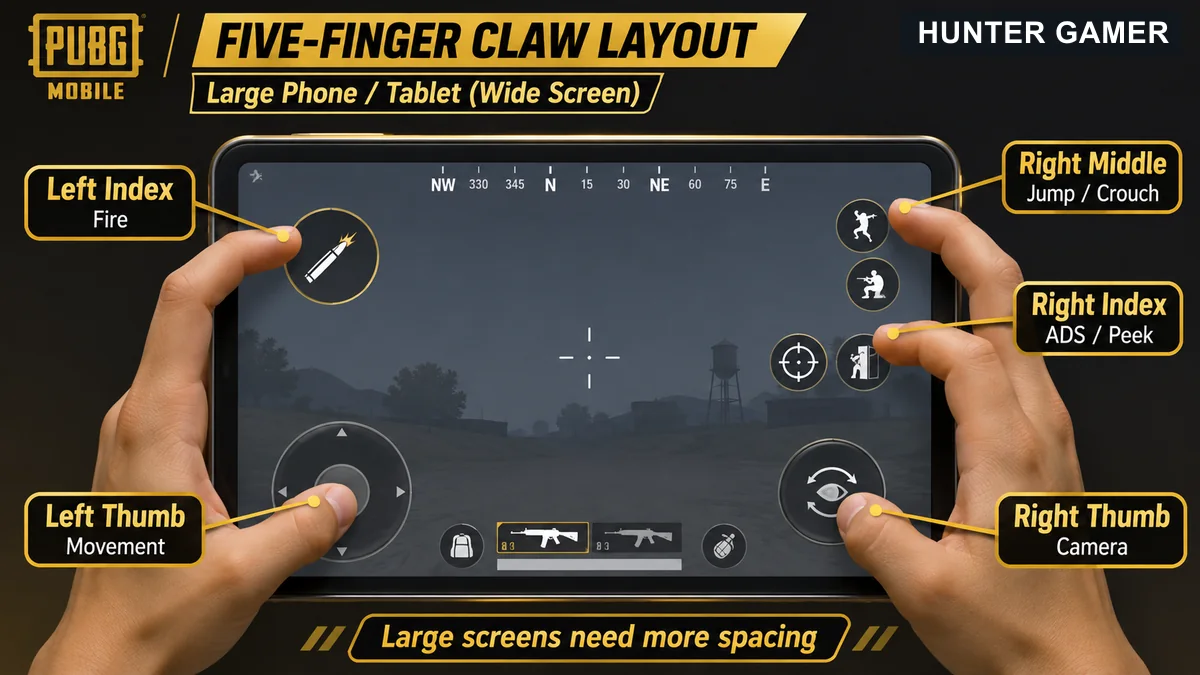
Large-screen five-finger PUBG claw map with separate movement, fire, camera, ADS or peek and jump or crouch touch zones
  • 6960-4887-1407-8797-709: tablet-style layout with an extra right-side finger, from the August 2026 BitTopup guide. It is meant for tablets and 6.7-inch+ / Pro Max phones. On a 6.3-inch phone the buttons stack on top of each other.

This is a community-shared code, not a verified pro export. Here is a typical 5 finger split:

  • Left thumb: movement.
  • Left index: fire, plus left peek.
  • Right thumb: camera and aim.
  • Right index: ADS, plus right peek.
  • Right middle: jump, crouch or prone.

Searching for a BGMI 5 finger layout? The same finger split works there, but BGMI and PUBG Mobile global keep separate layout clouds, so a code from one will not import into the other.

6 finger pro layout

Six fingers adds the left middle finger as well, usually for scope or crouch. In practice it is a tablet setup. Most phones do not have room for six fingers without your hands blocking the screen.

We have not seen a separate 6 finger global code in our checked sources, so we are not inventing one. If you want to try six fingers on a tablet, start from the tablet code above and move scope or crouch to your left middle finger.

You will see 6 finger codes credited to pro players online. Be careful with those. A famous name attached to a code does not prove that player ever exported it.

Layout by phone size

The same code feels very different on a 6.1-inch phone and on an 11-inch tablet. Here is how to adjust.

Small phones (under 6.3 inches)

  • Use 3 fingers, or 4 at most. On small screens, 5 finger layouts lead to accidental taps.
  • Drop the fire button to 90-95% if it clips the screen edge.
  • Leave about 15% of a button width of space between fire, peek and crouch.

Big phones (6.5-6.8 inches)

  • 4 fingers is comfortable. Try 5 only after a few weeks on 4.
  • Keep fire at 120-140%. On tall 19:9 and 20:9 screens, move the top row down to clear the notch or punch-hole.
  • On curved-edge Samsung phones, pull fire and ADS slightly inward.

Tablets

  • This is where 5 and 6 finger layouts make sense.
  • Set fire to 130-150% and spacing to 20-25%, because your hands are further apart.
  • Gyro aiming needs the whole device to tilt, so a heavy tablet suits touch aiming better.

Whatever the size, a layout cannot fix frame drops. If your phone stutters, fix PUBG Mobile lag first, because jittery frames will ruin the muscle memory you are trying to build.

Practice routine for a new layout

Commit to one layout for at least two weeks. If you switch codes after every bad match, your fingers never learn anything.

  1. Days 1-3: 15 minutes in Training Ground. Shoot dummies while strafing, using the new fire finger only.
  2. Days 4-7: add peek and crouch spam while you fire. Try a few TDM matches.
  3. Week 2: 30-45 minutes a day, mostly TDM, plus unranked Classic.
  4. Week 3+: go back to ranked. Only move a button if the same mis-tap keeps happening.

Your K/D will dip at first, bhai, and that is normal. If you are still fighting the layout after three weeks, go back down one finger. That is a smart choice, not a failure.

Sharing a layout in-game is free. Never pay for a “secret” code, because no layout gives auto headshots or zero recoil. For more free guides, see our gaming guides hub.

Frequently asked questions

Is 5 finger better than 4 finger?

Only on big screens, and only after you master 4 fingers. A fifth finger takes over jump, crouch or peek so your aiming thumb never leaves the camera. On phones under 6.5 inches it mostly causes accidental taps. Most players do better sticking with 3 or 4 fingers.

What is the best 3 finger claw code?

No single code works best on every phone, and our checked 2026 source does not list a dedicated 3 finger code. Import 6974-6998-1946-2820-026, put fire top-left for your left index finger and keep ADS and crouch near your right thumb, then save the result as your own code.

Why is my layout code not working?

Codes stop working when the uploader deletes or edits their slot, or when a game update rejects older IDs. Check that you pasted the full code with hyphens, and that you are in PUBG Mobile global rather than BGMI. If it still fails, the code is dead, so try another or build your own.

Can BGMI layout codes work in PUBG Mobile global?

No. BGMI and PUBG Mobile global use separate layout clouds, so a code from one will not import into the other. The finger split and button sizing advice still applies, so you can rebuild the same layout by hand.
Published by

Hunter Gamer

Hunter Gamer has covered games, esports, and streamers for readers in Bangladesh and beyond since 2019. The site publishes gaming news and explainers, practical settings and troubleshooting guides for mobile and PC players, Bangladesh buying information for gaming hardware and digital products, and profiles of creators alongside their official channels.

Articles are built on official game, platform, and product information where it is available, and sources are linked when a claim needs attribution. Because prices, release dates, and game settings change, each article carries a review date and readers are asked to check the linked source before buying anything or changing an account setting. Where something cannot be verified, the article says so rather than guessing. Articles are revised when an error is found or when a change makes an older guide misleading — corrections and news tips are welcome through the contact page.

About Hunter GamerSpotted an error? Tell us

Previous Post

Graphics Card Price in Bangladesh 2026: Honest GPU Guide

Next Post

Free Fire Sensitivity Settings 2026: Headshot Settings for Every Phone (2GB–8GB RAM)

Related Posts

Symbolic illustration of floating glass control panels with gold and orange buttons above a landscape phone.
Mobile Games

Free Fire HUD Share Code: Import and Setup Guide (2026)

November 19, 2026
Illustration of a tilted phone above training targets with an amber rotation arrow.
Mobile Games

PUBG Mobile Gyroscope Not Working? 2026 Checklist

November 17, 2026
Two smartphones moving a glowing stream with a soccer ball from the old phone to the new phone under stadium lights.
Mobile Games

eFootball Mobile Data Transfer: New Phone Guide (2026)

November 16, 2026
Next Post
Illustrative thumb movement and crosshair adjustment on a mobile training target

Free Fire Sensitivity Settings 2026: Headshot Settings for Every Phone (2GB–8GB RAM)

Fictional tactical practice range with a visible cyan crosshair centered on a target

25 Best Valorant Crosshair Codes 2026 (Copy-Paste + How to Import)

PUBG Mobile Graphics settings illustration selecting Smooth and the highest frame rate supported by the phone

PUBG Mobile Best Graphics Settings 2026: Smooth 90 FPS Without Lag

Categories

  • Mobile Games
  • News
  • PC Games
  • PUBG
  • Reviews

Topics

2024 PUBG tricks Best Fortnite Xp Maps Best Games Cyberpunk Days Gone Fortnite Fortnite Xp Maps Gamer Lag fix PMPL 2023 South Asia PUBG PUBG game performance PUBG mobile lag fix PUBG Mobile Redeem Codes 2023 Xp Maps
  • Top-Up Shop
  • About Us
  • Contact
  • Privacy Policy and Data Protection
  • Terms and Conditions of Website Use
  • Refund and Returns Policy for Digital Products
Call us: +880 1711 189127

Copyright © 2020 - 2026 Hunter Gamer · All Rights Reserved.

Welcome Back!

Login to your account below

Forgotten Password?

Retrieve your password

Please enter your username or email address to reset your password.

Log In
No Result
View All Result
  • Shop
  • Home
  • Mobile Games
    • PUBG
  • PC Games
  • Reviews
  • News
  • Insights
  • Streamers
    • Australia
    • Bangladesh
    • Canada
    • Hong Kong
    • India
    • Indonesia
    • Malaysia
    • Moroccan
    • Nepal
    • Singapore
    • Spain
    • Taiwan
    • Thailand
    • Türkiye
    • United Kingdom
    • United States
    • Vietnam
  • Online Games
    • Dex Ball

Copyright © 2020 - 2026 Hunter Gamer · All Rights Reserved.