• Latest
  • Trending
  • All
Affordable streaming microphone, webcam, ring light, headphones, laptop and network cable arranged on a table

Budget Streaming Setup Under $500 Bangladesh Guide

November 16, 2026
Symbolic illustration of floating glass control panels with gold and orange buttons above a landscape phone.

Free Fire HUD Share Code: Import and Setup Guide (2026)

November 18, 2026
Illustration of a tilted phone above training targets with an amber rotation arrow.

PUBG Mobile Gyroscope Not Working? 2026 Checklist

November 17, 2026
A curved gaming monitor showing a colorful game scene with a glowing timeline bar below it, one segment highlighted in gold.

Steam Game Recording Guide 2026: Save and Export Clips

November 17, 2026
Two smartphones moving a glowing stream with a soccer ball from the old phone to the new phone under stadium lights.

eFootball Mobile Data Transfer: New Phone Guide (2026)

November 16, 2026
A smartphone wrapped in a glowing orange energy dome with a chain of light linking it to a floating shield emblem.

How to Bind a Free Fire Guest Account Safely in 2026

November 16, 2026
A golden footballer hologram rising from a smartphone screen toward a floating golden shield with a check mark.

PUBG Mobile Account Recovery 2026: Choose the Right Option

November 16, 2026
valorant settings guide hero

VALORANT Settings Guide: Seven Options Worth Checking

November 16, 2026
Five glowing crystal obelisks in different colors on a dark arena floor.

VALORANT Agent Profiles: All Abilities, Roles and How to Play Them

November 16, 2026
Blue and amber blocks labeled Version 4.7, November 12, and Flash, November 13, 2026.

PUBG Mobile 4.7 and Flash Release Dates: November 2026

November 16, 2026
Editorial illustration of a stylized game profile screen with an ornamental nickname banner made of star and bracket symbols above a stat panel.

PUBG Mobile Name Symbols 2026: What Works and How to Change Your Name

November 16, 2026
Editorial illustration of a rugged metal supply capsule descending by parachute onto a rocky island as a storm and distant lightning gather over the sea.

Free Fire Storm Arena 2026: Free Rewards and What to Check

November 16, 2026
OBS virtual camera settings for gaming calls guide for Bangladesh gamers, updated November 2026

How to Set Up OBS Virtual Camera for Gaming Calls

November 16, 2026
  • About Hunter Gamer
  • Advertising & Sponsorship Opportunities
  • Contact Us for Gaming News & Support
Wednesday, November 18, 2026
  • Login
Hunter Gamer
  • Shop
  • Home
  • Mobile Games
    • PUBG
  • PC Games
  • Reviews
  • News
  • Insights
  • Streamers
    • Australia
    • Bangladesh
    • Canada
    • Hong Kong
    • India
    • Indonesia
    • Malaysia
    • Moroccan
    • Nepal
    • Singapore
    • Spain
    • Taiwan
    • Thailand
    • Türkiye
    • United Kingdom
    • United States
    • Vietnam
  • Online Games
    • Dex Ball

No products in the cart.

No Result
View All Result
Hunter Gamer
  • Shop
  • Home
  • Mobile Games
    • PUBG
  • PC Games
  • Reviews
  • News
  • Insights
  • Streamers
    • Australia
    • Bangladesh
    • Canada
    • Hong Kong
    • India
    • Indonesia
    • Malaysia
    • Moroccan
    • Nepal
    • Singapore
    • Spain
    • Taiwan
    • Thailand
    • Türkiye
    • United Kingdom
    • United States
    • Vietnam
  • Online Games
    • Dex Ball
No Result
View All Result
Hunter Gamer
No Result
View All Result

Budget Streaming Setup Under $500 Bangladesh Guide

November 16, 2026
in News
Reading Time: 6 mins read
0 0
Home News
9
VIEWS
Share on FacebookShare on Twitter

Starting a streaming career in Bangladesh in 2026 does not demand a five-figure budget. The right $500 setup produces professional-quality broadcasts that compete with streamers spending triple the amount. This guide breaks down every component: webcam, microphone, lighting, PC upgrades, software and extras, all priced in Taka with tested recommendations from Bangladesh’s active streaming community.

Why $500 Is the Sweet Spot for New Streamers

Streaming below $200 usually means sacrificing video or audio quality. Streaming above $1,000 as a beginner means buying gear your channel cannot justify. Five hundred dollars — roughly 55,000 Taka at 2026 exchange rates — buys every essential at the tier where quality jumps noticeably.

This budget assumes you already own a gaming PC or laptop. This article focuses purely on the streaming layer — the gear between you and your audience.

The Four Pillars of Any Streaming Setup

Every streamer setup rests on the same four pillars: video (your face), audio (your voice), processing (encoding), and connectivity (uploading without lag). A $500 budget forces you to optimize one pillar at a time.
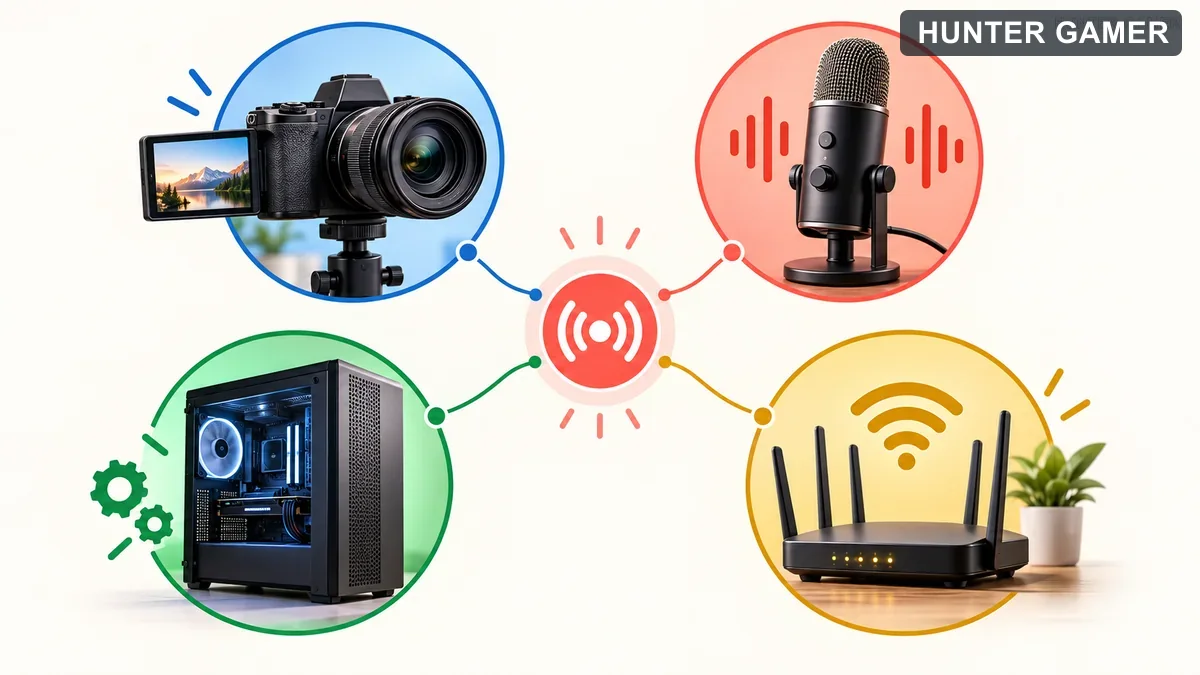
Diagram showing camera, microphone, computer processing and network connection feeding a live stream

Here is the priority order that works for 90% of Bangladesh streamers:

Priority 1: Microphone > Webcam. Viewers tolerate average video if the audio is clean. They do not tolerate great video with crackling, echo-filled audio. Allocate at least 40% of your budget to a real USB mic.

Priority 2: Lighting > Expensive Camera. A $30 ring light makes a $25 webcam look like a $100 webcam. Lighting is the cheapest performance multiplier.

Priority 3: Stable Internet > Flashy Extras. If your upload speed dips below 5 Mbps, RGB gear is decoration on a sinking ship.

Priority 4: Free Software First. OBS Studio is free, open-source, and used by professionals worldwide. You do not need paid software until your channel monetizes.

Component-by-Component: The $500 Bangladesh Kit

1. Microphone (Budget: 12,000–18,000 Taka)

Recommended: Fifine K669B (12,500 Taka) or Maono AU-A04 (14,000 Taka). Both are USB condenser mics with cardioid pickup, desktop stands, and mute buttons.

Why USB over XLR? XLR mics need an audio interface that costs another 8,000–15,000 Taka. For a $500 total budget, a good USB mic beats a mediocre XLR setup.

2. Webcam (Budget: 6,000–9,000 Taka)

Recommended: Logitech C920 (8,500 Taka) or Rapoo C280 (6,200 Taka). The C920 is the gold-standard budget webcam: 1080p30, autofocus, decent low-light performance.

3. Lighting (Budget: 2,500–4,000 Taka)

Recommended: 10-inch Ring Light with Tripod (2,800 Taka). Position it behind your webcam for instant even lighting.

4. PC Upgrades (8,000–15,000 Taka)

RAM upgrade: 8GB to 16GB (9,000 Taka). Streaming while gaming eats RAM.
NVIDIA NVENC: If you have GTX 1650+, enable NVENC encoding in OBS to offload from CPU to GPU.

5. Software Stack (Free)

  • OBS Studio: Free, open-source, industry standard. Download here.
  • Streamlabs OBS: Free, beginner-friendly alternative.
  • Restream.io: Free tier streams to Twitch + YouTube + Facebook simultaneously.

Sample $500 Build (54,500 Taka)

ComponentProductPrice (Taka)
MicrophoneFifine K669B12,500
WebcamLogitech C9208,500
Lighting10″ Ring Light2,800
RAM Upgrade8GB DDR49,000
Boom ArmMic Stand2,500
Pop FilterFoam500
SoftwareOBS (free)0
TOTAL35,800

Where to Buy Gear in Bangladesh

Online: Ryans Computers, Star Tech, Pickaboo, Daraz
Offline (Dhaka): Multiplan Centre, IDB Bhaban
Payment: bKash, Nagad, local cards accepted

Internet Requirements

ResolutionFPSMin Upload Speed
720p303.5 Mbps
720p606 Mbps
1080p306 Mbps
1080p608 Mbps

ISP recommendations: Grameenphone Fiber, Robi Fiber (10+ Mbps plans ~1,200 Taka/month)
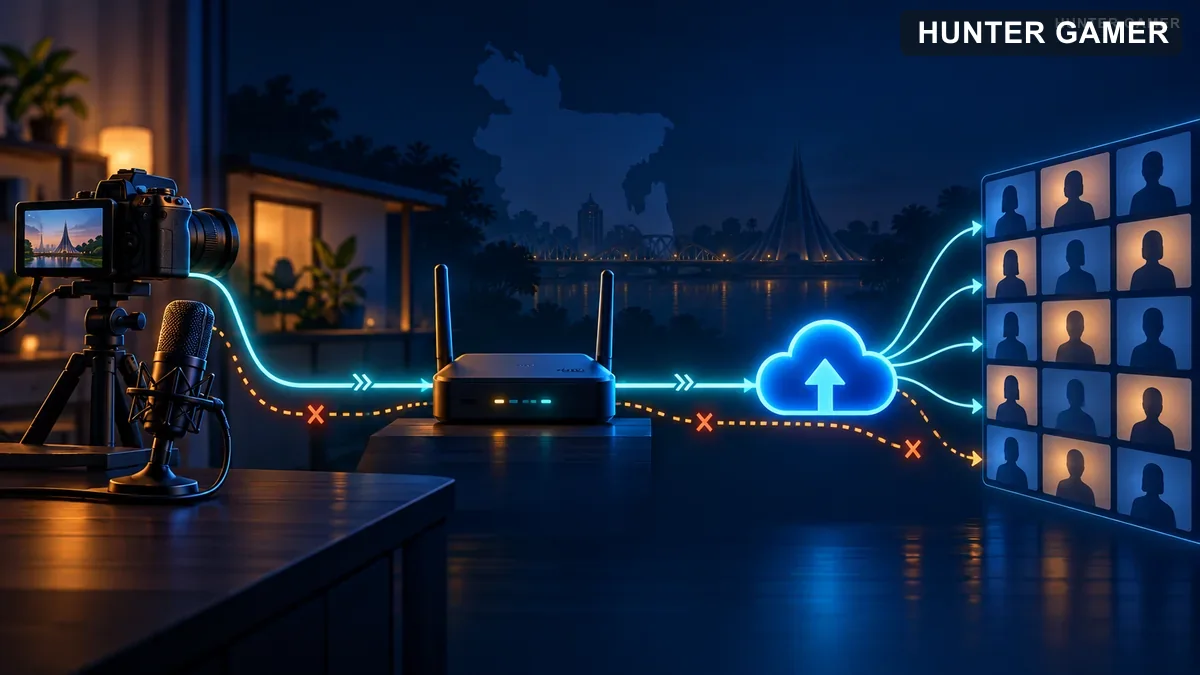
Illustrated path from camera and microphone through a router and cloud upload to viewers

What Bangladesh Pros Actually Use

Check real setups from our streamer directory:

  • Hunter Gamer — started with Fifine K669 + Logitech C920
  • Headshot King — budget ring light + phone camera setup
  • KUTTUSH — tournament setup with high-end mic

Browse all Bangladesh streamers for more inspiration, or read Bangladesh top gaming streamers for channel-building strategies.

Five Budget Mistakes to Avoid

  1. Buying a $100 webcam before a $50 mic. Audio > video.
  2. Skipping lighting. Cameras need light to look good.
  3. Streaming at 1080p60 on 5 Mbps upload. Match bitrate to bandwidth.
  4. Buying a capture card for single-PC streaming. OBS + NVENC is free.
  5. Upgrading gear before fixing content. Personality beats production quality.
Can I start streaming with less than $500?

Yes. A basic setup (USB mic + ring light + OBS) costs $150-200. The $500 budget covers quality tiers where viewer experience noticeably improves.

Do I need a webcam to stream?

No. Many successful streamers run gameplay-only streams. A webcam helps build connection, but personality matters more.

What is the best mic under 15,000 Taka?

Fifine K669B (12,500 Taka) or Maono AU-A04 (14,000 Taka). Both are USB condensers with cardioid pickup and desktop stands.

Can I stream from my phone?

Yes, for mobile games (PUBG Mobile, Free Fire). Use phone + OBS on laptop + screen mirroring.

How fast should my internet be?

Minimum 3.5 Mbps upload for 720p30, 6 Mbps for 720p60. Test at speedtest.net.

That is the complete $500 streaming setup for Bangladesh in 2026. Prioritize audio first, light your face properly, match bitrate to upload speed, and invest in personality over RGB. Ready to join the community? Browse our streamer directory, read how Bangladesh’s top streamers built their channels, and grab your gear. See you live.

Can I stream with a laptop instead of a desktop PC?

Yes, many streamers use laptops successfully. Look for at least an Intel i5 or AMD Ryzen 5 processor, 8GB RAM, and a dedicated GPU (GTX 1650 or better). Gaming laptops from 2020+ can handle 720p streaming at 30fps.
Published by

Hunter Gamer

Hunter Gamer has covered games, esports, and streamers for readers in Bangladesh and beyond since 2019. The site publishes gaming news and explainers, practical settings and troubleshooting guides for mobile and PC players, Bangladesh buying information for gaming hardware and digital products, and profiles of creators alongside their official channels.

Articles are built on official game, platform, and product information where it is available, and sources are linked when a claim needs attribution. Because prices, release dates, and game settings change, each article carries a review date and readers are asked to check the linked source before buying anything or changing an account setting. Where something cannot be verified, the article says so rather than guessing. Articles are revised when an error is found or when a change makes an older guide misleading — corrections and news tips are welcome through the contact page.

About Hunter GamerSpotted an error? Tell us

Previous Post

Kick vs Twitch 2026: Which Is Better for New Streamers?

Next Post

TenZ Valorant Crosshair Code & Settings 2026

Related Posts

Blue and amber blocks labeled Version 4.7, November 12, and Flash, November 13, 2026.
Mobile Games

PUBG Mobile 4.7 and Flash Release Dates: November 2026

November 16, 2026
Editorial illustration of a rugged metal supply capsule descending by parachute onto a rocky island as a storm and distant lightning gather over the sea.
News

Free Fire Storm Arena 2026: Free Rewards and What to Check

November 16, 2026
OBS virtual camera settings for gaming calls guide for Bangladesh gamers, updated November 2026
News

How to Set Up OBS Virtual Camera for Gaming Calls

November 16, 2026
Next Post
Tiny green crosshair on an illustrated tactical practice range

TenZ Valorant Crosshair Code & Settings 2026

Conceptual comparison of manual browser resource controls and inactive browser tabs beside a game window

Opera GX vs Chrome for Gaming: Choose Your Browser Tools

Conceptual mobile redemption form with a warning symbol against a battle royale landscape

Free Fire Invalid Redemption Code Error: Fix It Safely Now

Comments 2

  1. Pingback: Opera GX vs Chrome for Gaming: Choose Your Browser Tools
  2. Pingback: Best Budget Gaming Phone Under 20000 Taka (BD)

Leave a Reply Cancel reply

Your email address will not be published. Required fields are marked *

Categories

  • Mobile Games
  • News
  • PC Games
  • PUBG
  • Reviews

Topics

2024 PUBG tricks Best Fortnite Xp Maps Best Games Cyberpunk Days Gone Fortnite Fortnite Xp Maps Gamer Lag fix PMPL 2023 South Asia PUBG PUBG game performance PUBG mobile lag fix PUBG Mobile Redeem Codes 2023 Xp Maps
  • Top-Up Shop
  • About Us
  • Contact
  • Privacy Policy and Data Protection
  • Terms and Conditions of Website Use
  • Refund and Returns Policy for Digital Products
Call us: +880 1711 189127

Copyright © 2020 - 2026 Hunter Gamer · All Rights Reserved.

Welcome Back!

Login to your account below

Forgotten Password?

Retrieve your password

Please enter your username or email address to reset your password.

Log In
No Result
View All Result
  • Shop
  • Home
  • Mobile Games
    • PUBG
  • PC Games
  • Reviews
  • News
  • Insights
  • Streamers
    • Australia
    • Bangladesh
    • Canada
    • Hong Kong
    • India
    • Indonesia
    • Malaysia
    • Moroccan
    • Nepal
    • Singapore
    • Spain
    • Taiwan
    • Thailand
    • Türkiye
    • United Kingdom
    • United States
    • Vietnam
  • Online Games
    • Dex Ball

Copyright © 2020 - 2026 Hunter Gamer · All Rights Reserved.