• Latest
  • Trending
  • All
Microphone and PC fan with a conceptual audio waveform representing mild noise reduction

OBS Mic Noise Suppression for Gaming Streams: RNNoise vs Speex

November 16, 2026

Steam Game Recording Guide 2026: Save and Export Clips

November 16, 2026
Two smartphones moving a glowing stream with a soccer ball from the old phone to the new phone under stadium lights.

eFootball Mobile Data Transfer: New Phone Guide (2026)

November 16, 2026
A smartphone wrapped in a glowing orange energy dome with a chain of light linking it to a floating shield emblem.

How to Bind a Free Fire Guest Account Safely in 2026

November 16, 2026
A golden footballer hologram rising from a smartphone screen toward a floating golden shield with a check mark.

PUBG Mobile Account Recovery 2026: Choose the Right Option

November 16, 2026
valorant settings guide hero

VALORANT Settings Guide: Seven Options Worth Checking

November 16, 2026
Five glowing crystal obelisks in different colors on a dark arena floor.

VALORANT Agent Profiles: All Abilities, Roles and How to Play Them

November 16, 2026
Blue and amber blocks labeled Version 4.7, November 12, and Flash, November 13, 2026.

PUBG Mobile 4.7 and Flash Release Dates: November 2026

November 16, 2026
Editorial illustration of a stylized game profile screen with an ornamental nickname banner made of star and bracket symbols above a stat panel.

PUBG Mobile Name Symbols 2026: What Works and How to Change Your Name

November 16, 2026
Editorial illustration of a rugged metal supply capsule descending by parachute onto a rocky island as a storm and distant lightning gather over the sea.

Free Fire Storm Arena 2026: Free Rewards and What to Check

November 16, 2026
OBS virtual camera settings for gaming calls guide for Bangladesh gamers, updated November 2026

How to Set Up OBS Virtual Camera for Gaming Calls

November 16, 2026
Editorial illustration of separate voice, game and combined audio recordings on translucent tapes

OBS Separate Audio Tracks: Record Your Mic and Game Audio for Stream Highlights

November 16, 2026
Editorial microphone and audio meter with a physical stop marking the output ceiling

OBS Microphone Limiter Settings: Control Loud Voice Peaks in Gaming Streams

November 16, 2026
  • About Hunter Gamer
  • Advertising & Sponsorship Opportunities
  • Contact Us for Gaming News & Support
Tuesday, November 17, 2026
  • Login
Hunter Gamer
  • Shop
  • Home
  • Mobile Games
    • PUBG
  • PC Games
  • Reviews
  • News
  • Insights
  • Streamers
    • Australia
    • Bangladesh
    • Canada
    • Hong Kong
    • India
    • Indonesia
    • Malaysia
    • Moroccan
    • Nepal
    • Singapore
    • Spain
    • Taiwan
    • Thailand
    • Türkiye
    • United Kingdom
    • United States
    • Vietnam
  • Online Games
    • Dex Ball

No products in the cart.

No Result
View All Result
Hunter Gamer
  • Shop
  • Home
  • Mobile Games
    • PUBG
  • PC Games
  • Reviews
  • News
  • Insights
  • Streamers
    • Australia
    • Bangladesh
    • Canada
    • Hong Kong
    • India
    • Indonesia
    • Malaysia
    • Moroccan
    • Nepal
    • Singapore
    • Spain
    • Taiwan
    • Thailand
    • Türkiye
    • United Kingdom
    • United States
    • Vietnam
  • Online Games
    • Dex Ball
No Result
View All Result
Hunter Gamer
No Result
View All Result

OBS Mic Noise Suppression for Gaming Streams: RNNoise vs Speex

November 16, 2026
in News
Reading Time: 4 mins read
0 0
Home News
8
VIEWS
Share on FacebookShare on Twitter

OBS Mic Noise Suppression Settings: RNNoise vs Speex in 2026

For OBS mic noise suppression settings, the main choice is between higher-quality suppression and adjustable control. OBS describes RNNoise as higher quality but with greater CPU usage, while Speex is configurable. That is the key difference to keep in mind when comparing these methods for a gaming stream.

As of October 2026, the documented Suppression Level control applies to Speex. Moving its slider further left makes suppression stronger, but stronger filtering can distort your voice. Rather than treating the strongest position as the best setting, keep that documented trade-off in view.

The filter is intended for mild background noise or white noise, including sounds such as PC fan noise. It is generally not effective against large amounts of background noise in a loud room. Neither method should be presented as a guaranteed fix for every noisy streaming space.

RNNoise: Higher Quality, Greater CPU Usage

OBS describes RNNoise as the higher-quality method, with greater CPU usage as the trade-off. For a gaming-stream article, that distinction matters more than an unsupported promise that a method will make every microphone sound perfect.

Balance of a microphone voice waveform and CPU processor activity

If your priority is the quality distinction stated in the OBS documentation, RNNoise is the method to consider. Its documented advantage comes with the CPU trade-off, so the quality claim should not be separated from that qualification.

The official documentation does not give a measured CPU increase or a game-performance result. This guide therefore does not attach a percentage, frame-rate claim, or hardware requirement to RNNoise. The supported comparison is simply higher quality at the cost of greater CPU usage.

Speex: Adjustable Suppression With a Voice-Clarity Warning

Speex is the configurable option in the documented comparison. As of October 2026, when the Method is set to Speex, Suppression Level specifies how much suppression the filter applies. This is the relevant control when you want to understand adjustable suppression rather than just choose a method.
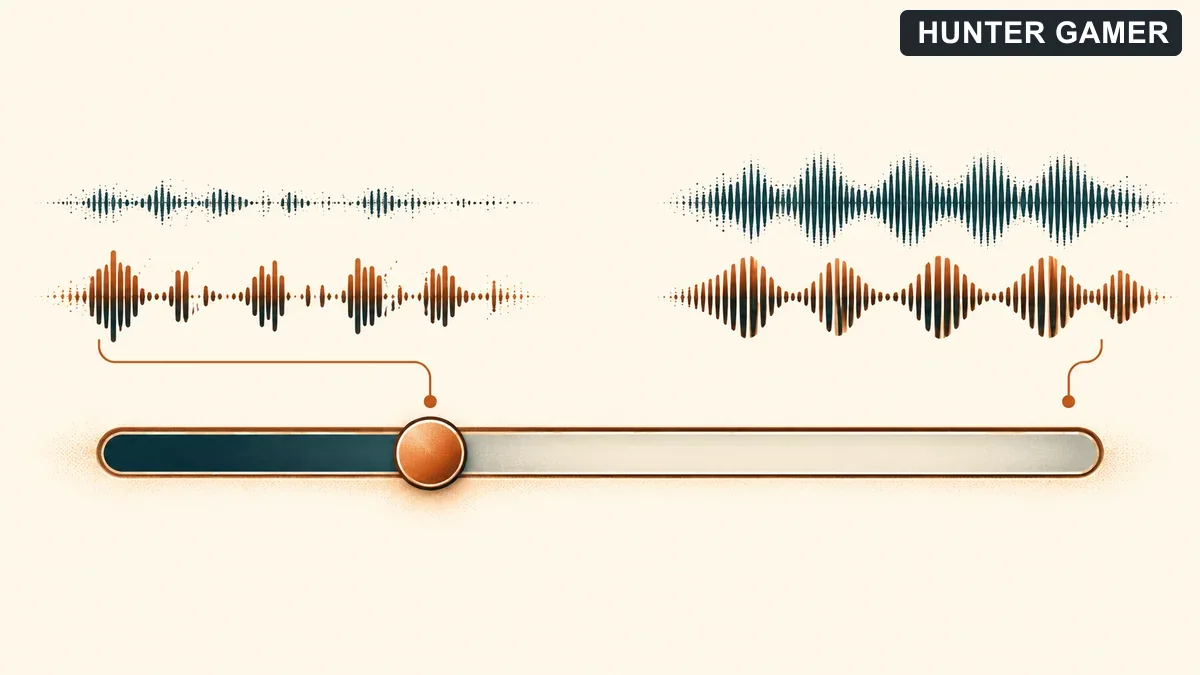
Conceptual slider showing stronger leftward suppression with reduced background waveform and possible speech distortion

As of October 2026, moving the Speex slider further left makes the filter stronger and causes it to filter out more sounds. The important word is “sounds”: the documentation also warns that this can distort other audio, including your voice.

That warning is central to understanding Speex. More suppression is not an unconditional improvement, because the same adjustment that filters more sound can also affect speech. A guide that recommends maximum filtering without mentioning voice distortion would leave out an important limitation.

This article does not provide a universal Speex preset. Instead, it explains the documented direction of the control and its downside: stronger filtering to the left, with possible distortion of your voice.

What Background Noise Can OBS Reduce?

OBS Noise Suppression can remove mild background noise or white noise from audio sources. The official description specifically mentions PC fan noise and other environmental noises as examples where it can be effective.

  • Mild background noise: This is within the filter’s documented purpose.
  • White noise: The description includes this among the sounds the filter can remove.
  • PC fan noise: OBS names this as an example of noise the filter can reduce effectively.
  • Loud-room noise: Large amounts of background noise are generally outside what the filter handles effectively.

The distinction is between reducing mild unwanted sound and expecting suppression to solve a loud environment. The documentation supports the former, not a blanket promise of silence. Keep that boundary in mind before choosing either method.

Keep the Settings Advice Within the Evidence

The official profile extract does not contain a complete procedure for adding the filter. It also does not establish a comparison with a noise gate. For that reason, this guide avoids inventing menu steps or presenting an unsupported explanation of gate behavior.

The useful comparison remains clear: RNNoise offers the documented quality advantage with greater CPU usage, while Speex provides adjustable suppression with a warning about possible voice distortion. Those are the supported points to use when deciding which approach fits your priorities.

For more reading on HunterGamer, explore the mobile games category or the informational top-up guides hub.

FAQ

Is RNNoise better than Speex?

OBS describes RNNoise as higher quality but with greater CPU usage. Speex is configurable, so the documented distinction is quality and CPU cost versus adjustable control.

Can stronger Speex suppression distort my voice?

Yes. As of October 2026, the documentation warns that stronger Speex suppression can distort other sounds, including your voice. Moving the slider further left increases filtering strength.

Will noise suppression fix a loud room?

Generally, no. OBS says the filter is generally not effective against large amounts of background noise. Its intended use is mild background noise or white noise, with PC fan noise given as an example.
Published by

Hunter Gamer

Hunter Gamer has covered games, esports, and streamers for readers in Bangladesh and beyond since 2019. The site publishes gaming news and explainers, practical settings and troubleshooting guides for mobile and PC players, Bangladesh buying information for gaming hardware and digital products, and profiles of creators alongside their official channels.

Articles are built on official game, platform, and product information where it is available, and sources are linked when a claim needs attribution. Because prices, release dates, and game settings change, each article carries a review date and readers are asked to check the linked source before buying anything or changing an account setting. Where something cannot be verified, the article says so rather than guessing. Articles are revised when an error is found or when a change makes an older guide misleading — corrections and news tips are welcome through the contact page.

About Hunter GamerSpotted an error? Tell us

Previous Post

OBS Recording Format for Bangladesh Gamers: MKV, MP4 and Safe Remuxing

Next Post

Raze Valorant Character Profile: Abilities, Role and Beginner Tips

Related Posts

Blue and amber blocks labeled Version 4.7, November 12, and Flash, November 13, 2026.
Mobile Games

PUBG Mobile 4.7 and Flash Release Dates: November 2026

November 16, 2026
Editorial illustration of a rugged metal supply capsule descending by parachute onto a rocky island as a storm and distant lightning gather over the sea.
News

Free Fire Storm Arena 2026: Free Rewards and What to Check

November 16, 2026
OBS virtual camera settings for gaming calls guide for Bangladesh gamers, updated November 2026
News

How to Set Up OBS Virtual Camera for Gaming Calls

November 16, 2026
Next Post
Raze-inspired Duelist beside a Blast Pack-like prop in a training arena

Raze Valorant Character Profile: Abilities, Role and Beginner Tips

Conceptual partial spray selection wheel with a selected spray painted on a tactical wall

VALORANT Spray Wheel Settings: Equip Sprays and Change the Keybind

Conceptual gaming livestream recorded to a possible cloud replay and a separate local drive

How to Save a YouTube Gaming Livestream Replay: Auto-Archive Limits and Backups

Categories

  • Mobile Games
  • News
  • PC Games
  • PUBG
  • Reviews

Topics

2024 PUBG tricks Best Fortnite Xp Maps Best Games Cyberpunk Days Gone Fortnite Fortnite Xp Maps Gamer Lag fix PMPL 2023 South Asia PUBG PUBG game performance PUBG mobile lag fix PUBG Mobile Redeem Codes 2023 Xp Maps
  • Top-Up Shop
  • About Us
  • Contact
  • Privacy Policy and Data Protection
  • Terms and Conditions of Website Use
  • Refund and Returns Policy for Digital Products
Call us: +880 1711 189127

Copyright © 2020 - 2026 Hunter Gamer · All Rights Reserved.

Welcome Back!

Login to your account below

Forgotten Password?

Retrieve your password

Please enter your username or email address to reset your password.

Log In
No Result
View All Result
  • Shop
  • Home
  • Mobile Games
    • PUBG
  • PC Games
  • Reviews
  • News
  • Insights
  • Streamers
    • Australia
    • Bangladesh
    • Canada
    • Hong Kong
    • India
    • Indonesia
    • Malaysia
    • Moroccan
    • Nepal
    • Singapore
    • Spain
    • Taiwan
    • Thailand
    • Türkiye
    • United Kingdom
    • United States
    • Vietnam
  • Online Games
    • Dex Ball

Copyright © 2020 - 2026 Hunter Gamer · All Rights Reserved.